
1-Visitor
April 25, 2017
Solved

Change routing of wire that is using Network

  • April 25, 2017
  • 1 reply
  • 5590 views

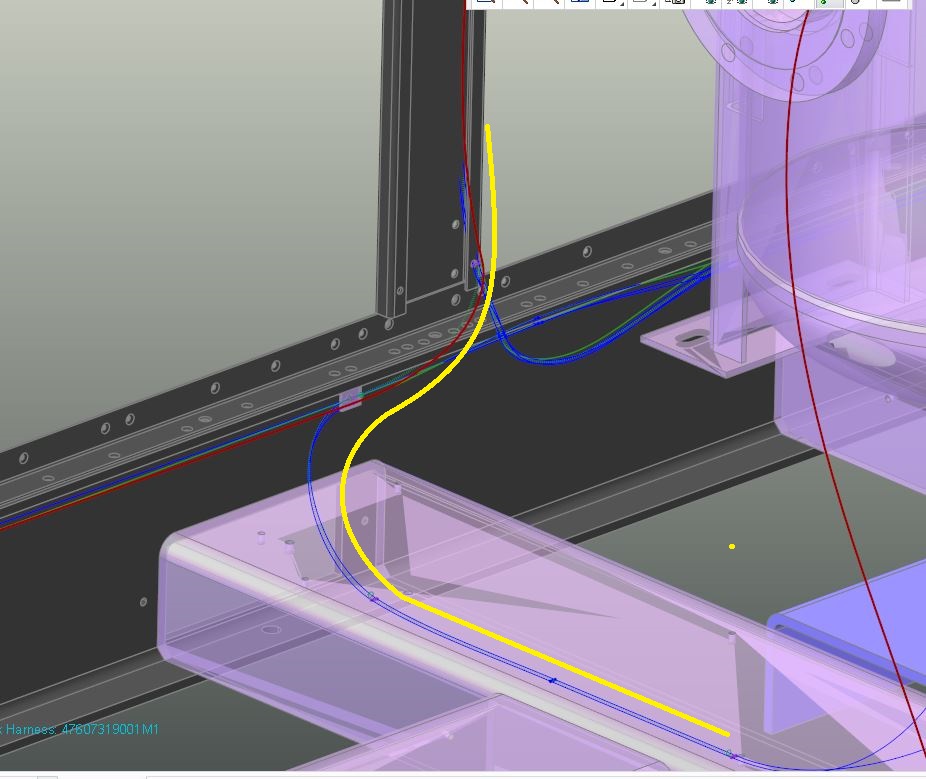
I am very new to creating harnesses and am trying to figure out how to change the routing of a wire that is not routing along the network how I would like it.  In the picture the wire in question is in dark red and the path I want it to take is in yellow.

How do I go about changing that path?

Thanks

Chris
Capture.JPG

Best answer by lernst-2

Hi Chris,

Move your mouse on top of the WIRE that is not following the network path to highlight it.  Once it is highlighted, right mouse click and select "Insert Locations".  Next pick the location point on the network you want to follow, then select the check mark (done).  You will have to do this step several times to ensure it follows the path you want.

Kindest regards,

Lori

1 reply

lernst-21-VisitorAnswer
1-Visitor
April 25, 2017

Hi Chris,

Move your mouse on top of the WIRE that is not following the network path to highlight it.  Once it is highlighted, right mouse click and select "Insert Locations".  Next pick the location point on the network you want to follow, then select the check mark (done).  You will have to do this step several times to ensure it follows the path you want.

Kindest regards,

Lori

cleamon1-VisitorAuthor
1-Visitor
April 25, 2017

OMG that was too easy.. I was making it harder than it had to be.  haha