
1-Visitor
July 2, 2017
Solved

Constraints using Inventor models - axises not visible

  • July 2, 2017
  • 2 replies
  • 8978 views

Hello everyone,


I am trying to investigate mechanism simulation in PTC Creo 4.0 using models imported from Autodesk Inventor 2017.


In the other topic I started (which unexpectedly dissapeared) I got information I should use mechanism constraints in the Creo to run mechanisms. I tried to do that, but I encoutered number of issues, if someone helps here, that would be highly appreciated:


Do I have to assembly whole model, part by part using PTC Creo constraints to study mechanisms? Is it possible to set only those constraints being meaningful for mechanism movement and left all the others as it was all set in the Inventor? I tried to do that but I found it impossible to change Inventor constraints to eg. Pin conection. I can't choose Pin conection (see attached)
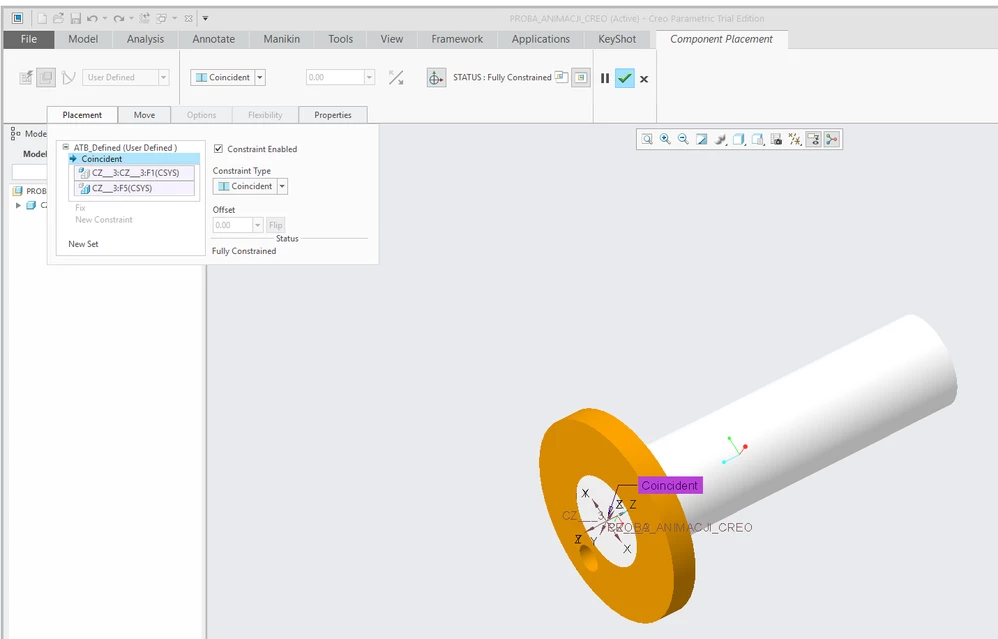
 cant_change_to_pin_constraint.png

At the same time when I tried to import Inventor parts one by one and tried to assembly them step by step I also was not able to do that. When I wanted to use Pin constraint that was possible, but I could not see the axises. Using parts created in Creo everything was all right. (see attached)
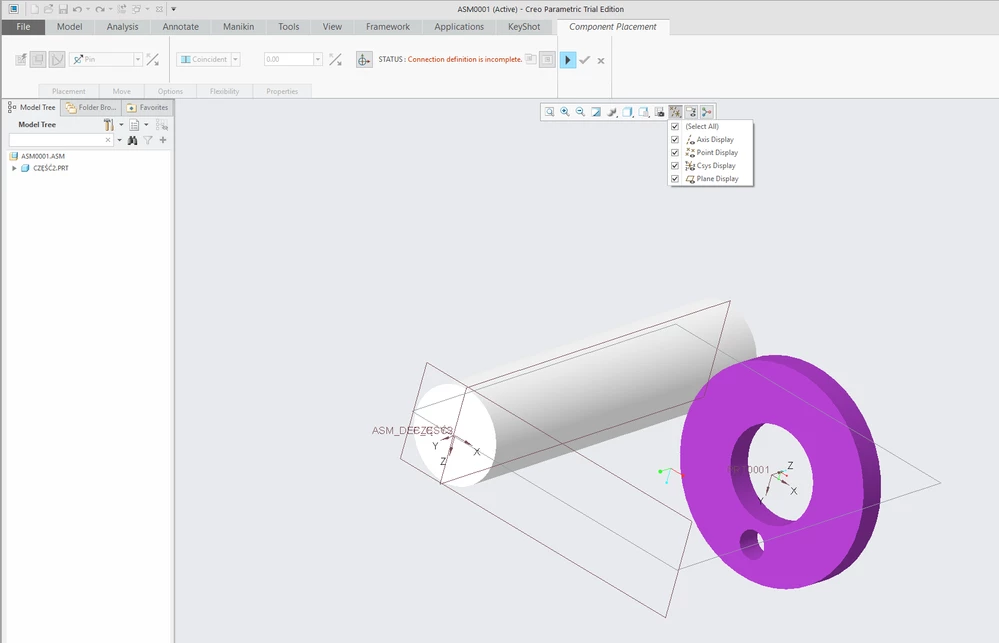
no_axises_visible_inventor_models.png


Thank you for all the support,

Oskar Kos

Best answer by MartinHanak

Hi,


1.]

You have to create axes in 2nd and 3rd component.


2.]

You have to remove current assembly constraits related to 2nd and 3rd component and define new constraint sets. This step is necessary because components are assembled using Csys(component)-Csys(top assembly) constraint, only - this means 3rd component is not assembled relatively to 2nd component.


3.]

Creo 4.0 does not enable to combine standard and mechanism constraints. Older release have the same limitation.


4.]

Your goal - import Inventor assembly and create mechanism in Creo - is very time consuming. You have to rebuild the whole assembly using Inventor parts.


MH


2 replies

24-Ruby III
July 2, 2017

Hi,


if you can replace original constraint set with new one, you have to uncheck Constraint Enabled option related to original set.


Please add data set for testing purposes, if you want someone help.


MH

Oskar_Kos1-VisitorAuthor
1-Visitor
July 2, 2017

Hello,


Thank you for the answer.


After unchecking "Constraint Enabled" I indeed can disable particular constraint but adding new one I can not choose pin constraint and the others like one the picture below:


no_constraints_user_definied.png


My goal is to import Inventor model, set the mechanism and export it via .FRA file into Keyshot software. I did it already with parts designed in Creo but in general I need to do that with much more complex model designed in Inventor. See video below:


https://youtu.be/h5TQ5JdwRHQ


Please find attached inventor model I try to do the same with. Hopefully it's gonna work that way.


Oskar Kos

Oskar_Kos1-VisitorAuthor
1-Visitor
July 10, 2017

Sweet God, YOU ARE GREAT !


That is exactly what I was looking for ! Thank you very much! I did not figure out that you can set the timing for each motor in one analysis. Thank you very much once again, you saved a lot of my time.


The topic now became "off topic" a little bit but my problem has been definately solved. Thank you for your support and time. I will post the final render once it's done.


Oskar Kos

1-Visitor
July 2, 2017

If you posted the evening before the change to the new forum, that post may not have been moved.


The imported files may not have axes. You may not have asked Inventor to export them or they are on a layer that is blanked and cannot be seen regardless of the axis environment visibility setting.


Since you aligned the coordinate systems in the first example, there is no way to convert that to a 'predefined' or motion connection.