
4-Participant
May 17, 2024
Solved

Converting Assembly to Part

  • May 17, 2024
  • 1 reply
  • 6861 views

Version Creo 9 

Good Morning. I received this as a step file which opens as a assembly. I am making one of the horizontal pieces about 17" longer. Because it is an assembly with no constraints already built in, I have to move and constrain all pieces next to the 17" lengthened pipe. Is there a way to just save this as a multibody part and make the change so that everything moves together?
I have tried file and save as to see if I could just output it as a part but that doesn't seem like an option. I am used to Solidworks where everything is easier. Thanks in advance
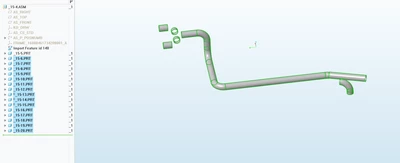
PK_11078287_0-1715955386700.png


Best answer by kdirth

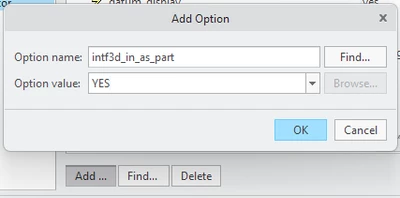
In the configuration editor you can select Add... and enter the config and setting.  For hidden configs you will have to type in all of the text for the name and value as they will not show up.

kdirth_0-1715961224720.png


1 reply

21-Topaz I
May 17, 2024

You can import it as a part using the hidden config option 

intf3d_in_as_part YES

Put this line in your config.pro. Since it is hidden it will not show up if you search for it.


This will create a single body part. Multibody assembly to part is coming in a future release.


I am not sure any of this is exactly what you want though. 


@Phil_K wrote:

 make the change so that everything moves together?


In order for there to be relative changes there needs to be constraints or parametric relationships that tie the geometry together.


Sounds to me like what you want to do is open it as a part and then use flexible modeling to make it longer. You can do that with the config option above and the flexible modeling tab.

Phil_K4-ParticipantAuthor
4-Participant
May 17, 2024

Thank you for replying! Yes, that is what I want to do. 
Can you give me more details on the hidden config options? How do view/change them? In that area I can only see:

PK_11078287_0-1715957801634.png


24-Ruby III
May 17, 2024

@Phil_K wrote:

Thank you for replying! Yes, that is what I want to do. 
Can you give me more details on the hidden config options? How do view/change them? In that area I can only see:

PK_11078287_0-1715957801634.png


Hi,

open config.pro in Notepad/Notepad++ and type the option manually ... see below. Save file and restart Creo.

MartinHanak_0-1715960539999.png