
1-Visitor
November 7, 2017
Solved

Create sheet metal part defining the profile geometry

  • November 7, 2017
  • 1 reply
  • 4866 views

Hey guys,


I am creating a long Z shaped bracket. And I would like to control the profile and it's dimensions. 

Is there a way in Creo to sketch a profile and extrude it out?


Another option is obviously to draw one of the surfaces and then add a flange and then anoter flange. That can work for me as well. But I am curious if I can do that with the profile sketch.


Thank you very much!
Best answer by LndoVnBtchmrk

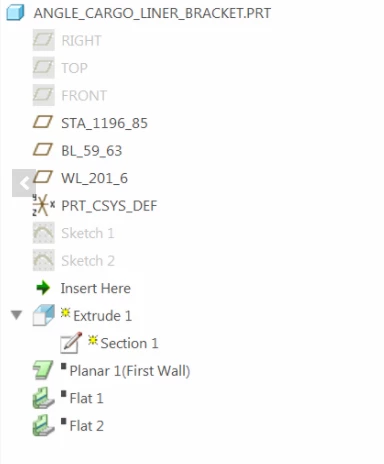
The "first wall" is a special designation in sheet metal given to the first solid geometry feature in a sheet metal part.  Your part already had it's first wall designated - the Planar 1 feature.  That is automnatic since it was the first feature.


In sheet metal, you can't insert or create solid geometry before/above that first wall feature.


Just delete Planar 1, Flat 2, & Flat 3 and then create your extrude feature.


Snap88.png

1 reply

12-Amethyst
November 7, 2017

Use the Extrude tool in sheet metal.  Sketch your profile and extrude as normal.  The sheet metal extrude will automatically add bends to any sharp edges.  See attachment.

pvn1-VisitorAuthor
1-Visitor
November 7, 2017

What Creo version do you use? I have 4.0 and it doesn't have this function. The "Extrude" it does have doesn't give options for the bend radius. It only makes the extrusion as per solid standards.


11072017_1.png

12-Amethyst
November 7, 2017

Creo 4 M020.  It's not a new functionality.


It's the extrude button right in the middle of your screen shot.  At the top of the "Shapes" section.


If you have existing geometry in your sheet metal part the Extrude tool will default to remove material.  Turn that button off to create geometry.