
1-Visitor
July 16, 2015
Solved

Creo 2.0 Distributed Batch.

  • July 16, 2015
  • 3 replies
  • 17754 views

Hello.

Im looking for any informations about distributed batch in CREO Parametric 2.0. In Pro/engineer i see was a small free program wchich help convert in one operation few .drw

to, for example: pdf format.

So,

1. My company have license to CREO parametric 2.0, but i wonder if CREO 2 have this type of module, (when yes), does my company have to

purchase another license for DB?

2. So second thing is, how to install it? Or maybe i can use some different optsion to do a batch processing some drw to pdf?
Best answer by MartinHanak

Hi,

if Creo Distributed Batch is installed then there is ptcdbatch.bat file in Creo2_LOADPOINT\Creo 2.0\Parametric\bin drirectory.

In Czech environment I had to modify this file - I added the following line at the beginning of the file:

set PRO_LANG=english

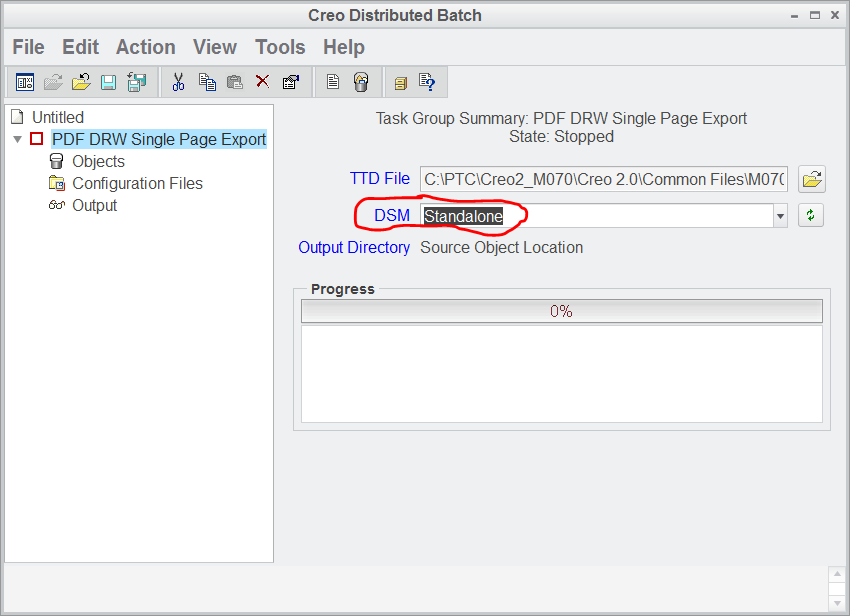
When you launch ptcdbatch.bat file the following window will open.

cdb.png

Using UI you can define required action. DSM = Standalone enables you to run a batch on your PC, only. You do not need to buy special batch license.

On the other side, if you want to run batch on specific PC in your network, then you have to buy special batch license.

Martin Hanak

3 replies

22-Sapphire I
July 24, 2015

Creo Distributed Batch needs to be install as additional feature in Creo 2.0. This is available under Customize > Additional features when installing Creo 2.0.

1-Visitor
October 19, 2016

i didnt see any Distribution Batch in customize> additional features while installation...

can you please tell  which option to select???

24-Ruby III
October 19, 2016

Hi,

during installation you have to click Customize button

customize1.png

and check Creo Distributed Computing Extension item.

customize2.png

MH

24-Ruby III
July 24, 2015

Hi,

if Creo Distributed Batch is installed then there is ptcdbatch.bat file in Creo2_LOADPOINT\Creo 2.0\Parametric\bin drirectory.

In Czech environment I had to modify this file - I added the following line at the beginning of the file:

set PRO_LANG=english

When you launch ptcdbatch.bat file the following window will open.

cdb.png

Using UI you can define required action. DSM = Standalone enables you to run a batch on your PC, only. You do not need to buy special batch license.

On the other side, if you want to run batch on specific PC in your network, then you have to buy special batch license.

Martin Hanak

kzmt1-VisitorAuthor
1-Visitor
July 25, 2015

Many thanks for reply.

But whats happen when my comapny dosent have license on each Computer, but have a floating licenses wchich

every PC (where is installation of Creo), "download" from our license server?

In this situation also i can use standalone license? (i want use DB only on one PC where i currently work on creo installation, i dont need use DB on network)

So second thing is when i dont have a administration pr. on my computer, it is neccesary to reinstal creo for install DB?

22-Sapphire I
July 25, 2015

Hi,

Distributed Batch is free (no license required). "Standalone" in Martin's reply is for service manager, if you don't have advance licenses for service manager you can use Standalone. You can simply execute the Distributed batch referring the steps in earlier reply.

If you didn't install distributed batch earlier, you can install distributed batch from installation media (using setup.exe)

22-Sapphire I
July 30, 2015

Did you mange to work on Distributed batch? If any of the information helps you, mark the appropriate replay as correct answer.