Creo 3, strange bug with draft dimensions not updating properly
Hello! I'm looking for some help tracing down a really weird error; On a few of our template drawings, (drawings & models that we save-as from repeatedly), certain dimensions on the drawing don't update properly after the model is updated.
That is to say, we'll update the model and regenerate, then switch windows to the drawing and most of the dimensions will have already updated. However one or two will sometimes change to some garbage value, neither what the dimension was before nor what it should be now. A manual regenerate of the drawing will then update these wayward dimensions to the proper value. The problem is that most of the dimensions will update correctly leading the user to think the drawing is fully updated and ready to print without doing a regen of the drawing.
We are currently running the following config.pro options, which makes me think it’s not an issue that the drawing itself isn’t updating.
save_display no
auto_regen_views yes
I'm trying to figure out the root cause of this issue, and ideally there's some sort of config option to fix this... As it stands a small percentage of our thousands of template files seem to be affected. However I can't seem to figure out what the pattern is between the affected dimensions. on affected drawings, deleting and re-creating the dimension seems to fix this issue... However to go through all of our templates, and previous jobs that we save-as from would be tens of thousands of drawings to completely re-do the dimensioning to track down this weird little bug.
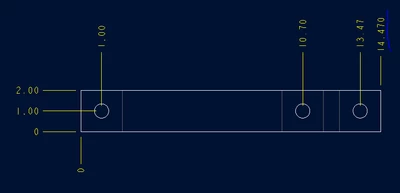
I've attached an example if you want to recreate the error. on first opening the drawing should look something like this:
Then switch over to the top level assembly and change the overall length. That can most easily be done by changing the parameters QTY or DIA in the relations. Then regenerate the model to update it.
Then switch back to the drawing. All changed dimensions on the drawing should update automatically, except the overall length dimension will have updated to a junk value:
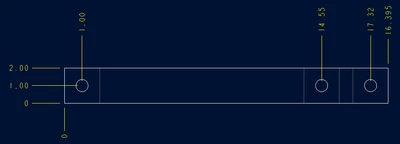
Then regenerate the drawing, and the overall length dimension will update to the correct value: