19-Tanzanite
January 28, 2021
Question

Creo 4.0 GD&T help - how to specify Unilateral / Unequally disposed profile of a surface control?

  • January 28, 2021
  • 1 reply
  • 4057 views

Hi everyone,


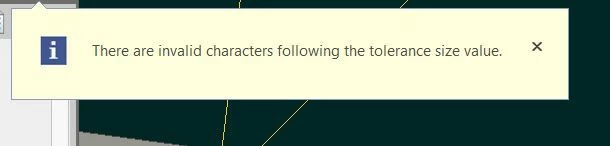
What's the correct syntax for Creo 4.0 to stop throwing this error about profile-tolerance:
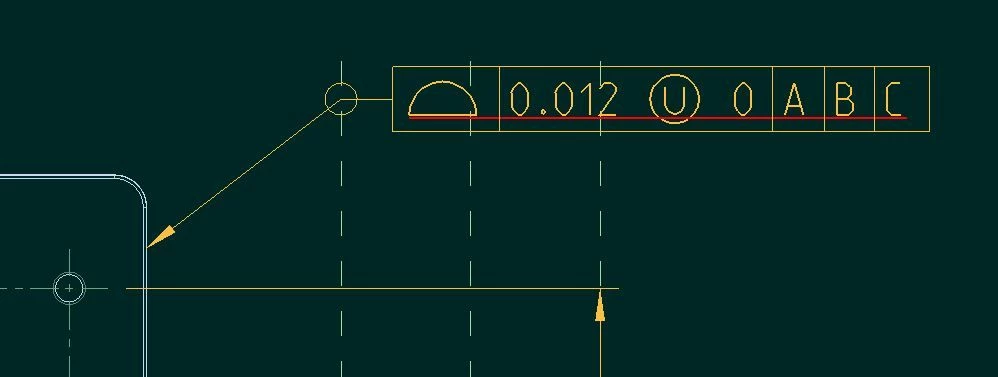
unequally disposed profileunequally disposed profileresulting errorresulting error


The underline appears as soon as the (U) symbol is put into the tolerance box.

1 reply

kdirth
21-Topaz I
21-Topaz I
January 28, 2021

That appears to be correct.  Creo does give me an error as soon as I add the U symbol, but it goes away if I put in an appropriate second value and click off the gtol.

kdirth_0-1611865124555.png

May be the gtol settings in you detail options.

There is always more to learn.
pausob19-TanzaniteAuthor
19-Tanzanite
January 28, 2021

Hi, thanks for the quick feedback.  I ask few more questions:

- are you putting spaces before / after the (U) symbol?

- are you making this FCF in the model or in the drawing?

- M version of Creo 4.0?

pausob19-TanzaniteAuthor
19-Tanzanite
January 28, 2021

I guess I have an answer;  I made my annotations in a combination state of the model.  The underline disappears if I make the Gtol in the drawing mode.


I'd be interested if anyone has tried this out in Creo >4 to see if this has been "fixed"?