
14-Alexandrite
October 3, 2011
Solved

Creo and Model-Drawing associativity - Broken!

  • October 3, 2011
  • 6 replies
  • 12627 views

Dear fellow Pro/Engineer zealots,

My company obviously is evaluating Creo as a replacement for Wildfire 4.0 and in the process we are considering the Flexible Modeling and Direct Modeling Application to be included in that upgrade. We have discovered what we consider a MAJOR issue (we consider it a bug). We've all been reading and hearing about all of the great things that flexible (Direct) modeling give us. However, with this introduction, one of the key benefits of Pro/Engineer has been broken. If you add a flexible edit feature (either using the Flexible Modeling extension in Creo Parametric or using Creo Direct), drawing dimensions will not update. This is true for both shown and created dimensions.

What if the flex edit only moved a particular face by .05 mm? For the types of products we develop, this is often done. This could easily be overlooked. The picture below shows an example. The 3 red dimensions are the original dimensions. The geomety at the right side of the view was moved using a flexible edit feature by .05 mm. the 3 dimensions did not update. The 3 green dimensions were added after the flexible edit feature to show what the values should be.
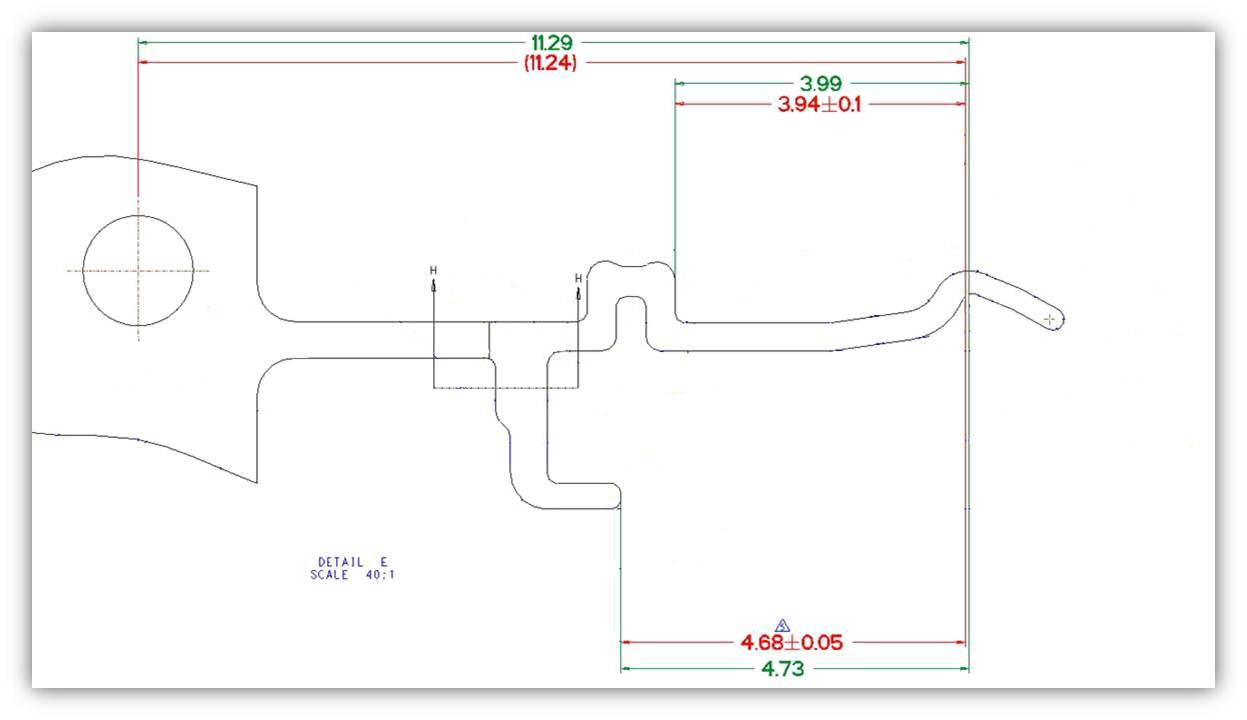
Creo_Dimension issu.jpg

We have decided that when we migrate to Creo, we will NOT be adopting Flexible Modeling or Creo Direct unless this has been fixed. There is too great a risk since 2D drawings are still our contractual document of record. Model to drawing associativity was one of the primary benefits for my company to switch to Pro/Engineer many years ago. We do not believe that we are the only ones that feel this is unacceptable and would like others to be aware of this issue. We would also like to hear other PTC customers' opinions as to the severity of this issue.

Kind Regards,

Ryan Gelotte

IT Engineering Analyst

TE Connectivity (formerly Tyco Electronics)


This thread is inactive and closed by the PTC Community Management Team. If you would like to provide a reply and re-open this thread, please notify the moderator and reference the thread. You may also use "Start a topic" button to ask a new question. Please be sure to include what version of the PTC product you are using so another community member knowledgeable about your version may be able to assist.
Best answer by brthompson

Ryan,

Great post! I think I've seen that picture somewhere before...

As you know, we are working on this issue. I wouldn't go so far as to call model and drawing associativity broken, however. In many instances, even in Pro/ENGINEER Wildfire 4.0, it is possible to make a change in a model and the result of that change is that a dimension on a drawing no longer coincides with the geometry it was supposed to control. The offset tool in Pro/ENGINEER is a good example of a tool that can do this and create exactly the same circumstances that you describe in your post.

Having said that, regardless of how likely it was to happen in previous releases, I'll agree that this circumstance is a lot more likely with the Flexible Modeling Extension. This is why we're working to address the problem in a special way when Flexible Modeling features are involved.

Best Regards,

Brian

VP, Creo Product Management

6 replies

1-Visitor
October 3, 2011

Hello Ryan,

what does your config option save_display say ?

This has bitten me too.

- yes means the drawing will be opened as saved. You have to update your drawing, regenerating wont help.

- no drawing an model will be regenerated.

This was in WF3, dont know about Creo.

HTH

Reinhard

edit

This option is dangerous as you might publish drawings which are not up to date. The designer should be tarred and feathered. The option must be in the open dialog for a drawing.

ryang14-AlexandriteAuthor
14-Alexandrite
October 3, 2011

Hello Reinhard,

save_display is set to yes. However, this is not the problem. The problem is that the dimensions (shown or created) still reference the original geometry which is still present in the Pro/E part file. Flex modeling generates new geometry with new id's. One of the secrets to Creo is how it forwards references to these new geometry id's. Unfortunately, this is not working for dimensions. In fact, the problem is also present when using 3D annotation features in the model. We have discussed this with PTC and they are well aware of this problem.

Ryan

1-Visitor
October 3, 2011

so updating your drawing does not help ?

Reinhard

1-Visitor
October 19, 2011

I think the Creo hype won't last very long... PTC still struggling to accept the fact that the only way they can solve the problems is really working on them.. Not spending millions in marketing and conferences in fancy hotels...

1-Visitor
October 20, 2011

At one of the TC Meetings we had in Needham, PTC demonstrated this functionality of flex edit. More than one person let PTC know that this was a disaster waiting to happen. I for one asked PTC to allow me to be able to turn off this functionality. Too much down stream still depends on the drawing. We still export drawing files in DWG, DXF, etc.... and send them to customers and vendors.

12-Amethyst
October 21, 2011

Ryan,

Great post! I think I've seen that picture somewhere before...

As you know, we are working on this issue. I wouldn't go so far as to call model and drawing associativity broken, however. In many instances, even in Pro/ENGINEER Wildfire 4.0, it is possible to make a change in a model and the result of that change is that a dimension on a drawing no longer coincides with the geometry it was supposed to control. The offset tool in Pro/ENGINEER is a good example of a tool that can do this and create exactly the same circumstances that you describe in your post.

Having said that, regardless of how likely it was to happen in previous releases, I'll agree that this circumstance is a lot more likely with the Flexible Modeling Extension. This is why we're working to address the problem in a special way when Flexible Modeling features are involved.

Best Regards,

Brian

VP, Creo Product Management

ryang14-AlexandriteAuthor
14-Alexandrite
December 15, 2011

Heard some really great news regarding this last week! Thanks for you support on this one Brian. Wish I could say I'll see you in January, but unfortunately I will not be able to attend the TC's.

Ryan

Patriot_1776
22-Sapphire II
November 4, 2011

Wow......nice. That's a HUGE issue. Who fell asleep at the switch on that one? Doesn't any testing go on before the code-jockeys send it out? SRSLY??? Nobody caught that, really? Honestly, even without this glaring bug, from what I've seen of the interface so far (Ugh!), I wish I could just stay on WF4 anyways........................

ryang14-AlexandriteAuthor
14-Alexandrite
November 16, 2012

Just got a demo of Creo 2.0 build M030 from Don Breda at PTC. This issue has been addressed with this build. I think everyone will be pleased. Thanks to Brian Thompson for making this happen and to Don for taking the time to show me.