
1-Visitor
September 21, 2022
Solved

Cross section cutting lines don't display correctly

  • September 21, 2022
  • 1 reply
  • 4082 views

I am using Creo Parametric - Release 8.0 (connected) Release 8.0 and Datecode8.0.5.0

Cross section cutting lines don't appear correctly when exporting PDF. The dots and dashes look too short.

This is what I'm getting https://drive.google.com/file/d/12AUXgavN0PHAdR7DDriC-8zjtaAcv0zH/view?usp=sharing

This is the desired result https://drive.google.com/file/d/1_FPd2YIHyBwxyVX0UdCaJEMIEKQC_e9J/view?usp=sharing
Best answer by MartinHanak

@AW_10407897 wrote:

Hi Martin, 

Unfortunately. Creo 3.0 and its files are no longer accessible after the upgrade. All I have left is the old PDFs (which look identical in all respects except the length of the section line dashes).


Hi,

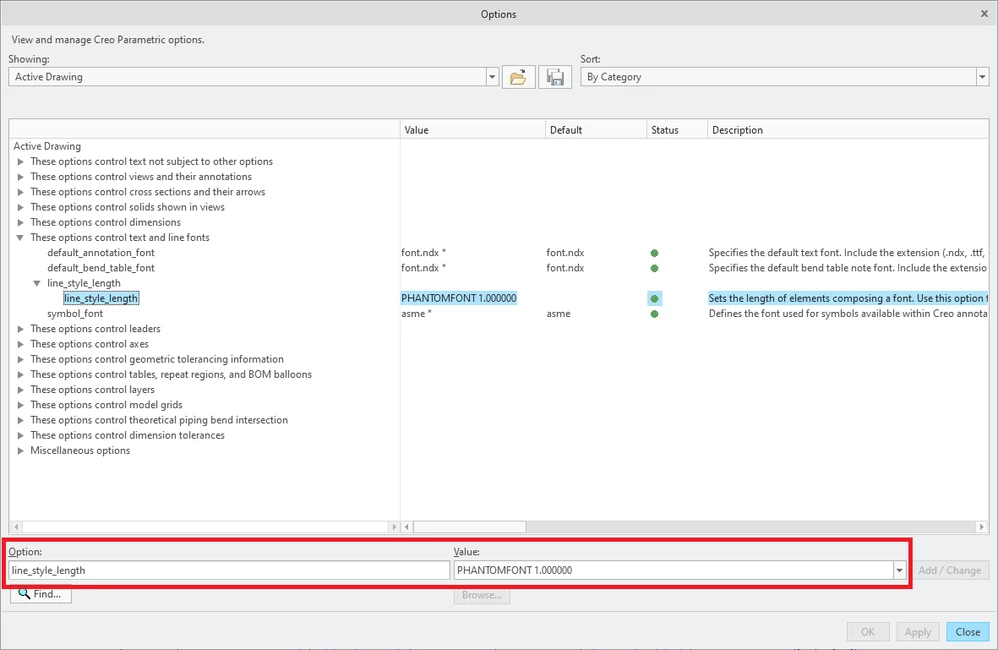
add new option into your drawing - see picture. The value in inches represents the length of line segment.

MartinHanak_0-1663863557365.png

line_style_length PHANTOMFONT 1.00000


1 reply

24-Ruby III
September 21, 2022

@AW_10407897 wrote:
I am using Creo Parametric - Release 8.0 (connected) Release 8.0 and Datecode8.0.5.0

Cross section cutting lines don't appear correctly when exporting PDF. The dots and dashes look too short.

This is what I'm getting https://drive.google.com/file/d/12AUXgavN0PHAdR7DDriC-8zjtaAcv0zH/view?usp=sharing

This is the desired result https://drive.google.com/file/d/1_FPd2YIHyBwxyVX0UdCaJEMIEKQC_e9J/view?usp=sharing

Hi,

please pack your model+drawing into zip file and upload it. This enable other users to investigate your problem.

1-Visitor
September 21, 2022

Hello, please see attached a zip file with an example model and the PDF output showing the problem.

24-Ruby III
September 22, 2022

@AW_10407897 wrote:

Hello, please see attached a zip file with an example model and the PDF output showing the problem.


Hi,

I am sending some information...


1.] Settings inside your drawing cause that cutting line and visible geometry edges are displayed using the same color, the name of this color is Geometry.

MartinHanak_0-1663847445871.png

2.] By default Geometry color is drawn by pen 1. I uploaded 3 examples of pen 1 width.

My pentable is also uploaded (packed in zip file).

My config.pro contains following options:

use_8_plotter_pens yes
pen_table_file E:\users\creo7_parametric\pentable.pnt
pdf_use_pentable YES