Cut In Assy - Bom Issue
Hello All,
Please see attached.
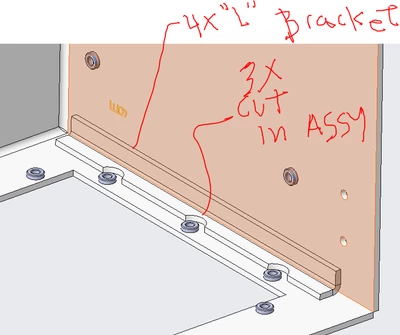
I have cut 3 "half moons" in my assy which cut thru the "L" bracket. I have 4 "L" brackets in a 4 sided - open front box. When I do this, the system intersects the cut with "3975as9102-4" - which results in the bom as 3 brackets and 1 bracket in the bom instead of 4 of the same. Is there a way to get this back to 4? I had the moons associated to the "L" bracket originally, but broke the association thinking it would fix the problem. Nope. It appears to be associated by the intersection Creo needs to perform. Thereby singling it out as it's own part. If it were done in part mode as a separate item that would make sense. But that is not the case.
The idea here is that we have the same 4 "L" brackets and in the assembly process one will need to be modified with the half moons and weld into place. The remaining 3 will not have the cuts. Otherwise the same bracket. I agree a bit unorthodox, but I am basically modeling up a 2d print again from ACAD to Creo and following the same intent as the original drawing specifies.
WayneF