10-Marble
February 25, 2025
Solved

Datum axis name position

  • February 25, 2025
  • 3 replies
  • 2286 views

Hi,

I have to create three Datum Axes with name D, E, F, based on a custom Coordinate System ("CS_DEF"), which is rotated relative to the original (XYZ) coordinate system.

My problem is that, if I create a Datum Axis based on the axis of the coordinate system, Creo puts the axis name on the opposite side of the direction of the coordinate system's axes.

How can I move the name of the axis to the opposite side?
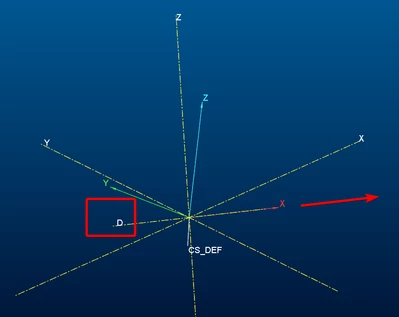
NG_12013596_0-1740484300228.png

thank you


Best answer by NG_12013596

I got a lot of useful ideas, and in the end, one plus one idea became the most useful for me 🙂

  1. Creating CSYS based on the default or previous CSYS (easy to set the origin and orientation)
  2. Define 3 planes based on the new CSYS's axes
  3. Define 3 datum axes based on the three new planes, setting their size
    The selecting order of planes affects where the label is positioned on the resulting datum axis.

The positive sides of this method:

  • Sketch references and mates refer with the correct name of axes 
  • I realized afterwards that I should have used the created planes for sketch anyway

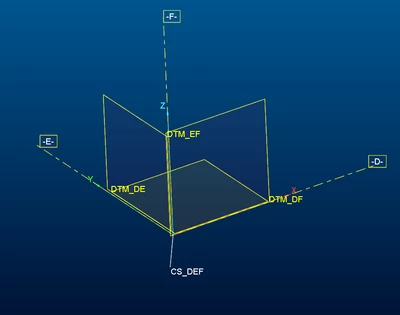
Created objects: CSYS, Planes, Axes

NG_12013596_0-1740748413008.png


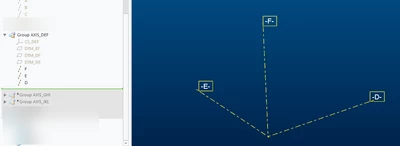
After hiding CSYS and planes, clear and nice:

NG_12013596_1-1740748573228.png


Thank you everyone for help.

3 replies

21-Topaz II
February 25, 2025

Don't know of any way to alter this behavior, never really mattered to me.

If visibility of such entities is a concern, due to overlapping and such, I do a few things:

(1) I rename the "important" axes to something that makes sense to me, like instead of "A_1" I'll name it "AXIS-CTR-PIVOT" or some such.

(2) Hide things that you don't want to see, or implement a layering scheme to put the geometric entities that are not of interest "away" so I don't see them. This is very necessary when working with models that have a proliferation of hundreds of datum planes, points, etc. I've had to endure working with models that looked like a hairball if I had all the datums visible.

As you'll notice as you define or redefine a datum like an axis or plane, there are few things that can be changed with respect to the Display of the datum. The location of the label is not one of them.

10-Marble
February 25, 2025

Yes, I understand you, the question arose because the axes of coordinate systems cannot be renamed.

I have to use ABC, DEF, etc coordinate systems in the model and also I have to see names and the (positive) directions of the axes. I tought the simplest solution to this would be to have the axis letter visible in the positive direction

23-Emerald III
February 25, 2025

I think that an axis does not have a positive or negative direction. 

23-Emerald III
February 25, 2025

@NG_12013596 

Axis creation is amazingly consistent though. Using my default coordinate system, I recreated the same thing you did. 

So I created another coordinate system, with the directions different from the default. I created a new axis for the coordinate system and the axis labels are on the other side.

So, if you can stand to have another coordinate system oriented differently, you can get your axis labels on the other side.


StephenW_0-1740501181649.png


10-Marble
February 25, 2025

It's unfortunate that it can only be solved with workarounds, I like solutions that are as clean as possible, but thanks for the idea.

NG_1201359610-MarbleAuthorAnswer
10-Marble
February 28, 2025

I got a lot of useful ideas, and in the end, one plus one idea became the most useful for me 🙂

  1. Creating CSYS based on the default or previous CSYS (easy to set the origin and orientation)
  2. Define 3 planes based on the new CSYS's axes
  3. Define 3 datum axes based on the three new planes, setting their size
    The selecting order of planes affects where the label is positioned on the resulting datum axis.

The positive sides of this method:

  • Sketch references and mates refer with the correct name of axes 
  • I realized afterwards that I should have used the created planes for sketch anyway

Created objects: CSYS, Planes, Axes

NG_12013596_0-1740748413008.png


After hiding CSYS and planes, clear and nice:

NG_12013596_1-1740748573228.png


Thank you everyone for help.

23-Emerald III
February 28, 2025

@NG_12013596 Nice solution...don't forget to mark your response as the solution.

Out of curiosity, I tested the axis creation based on datum selection order...it's a nice trick to get the label where you want it. I don't know where I can use it but it might come in handy one day!

10-Marble
February 28, 2025

Thank you, I hope it will be useful to you or someone else someday 😉