16-Pearl
March 16, 2017
Solved

Dimension Round Off

  • March 16, 2017
  • 1 reply
  • 8397 views

All,


In CREO 3.0 M020...


I have a part in a drawing. I rounded down the decimals in the drawing. When I return to the model, the dimensions are rounded down per attachment "dim1" in red. In attachment "dim2", I click the dimension and it shows it's unrounded value. First of all.....the dimensions are in red. If I regenerate, they remain red. I guess I am used to the round off forcing the dimensions to be finalized per attachment "dim 1" after a regenerate in say WF5, the last release I worked in. What's the deal? Have I changed them or not? I like the idea of a show dimensions that are allowed to be shown 2 place on the drawing but remain it's logical 3-4 place in the model I think. However I imagine it would get into "what is your true tolerance intent?" Confused. Maybe it's too early still?


WayneF 

Best answer by StephenW

Color schemes can be different but I suspect the red dimension are "locked" sketcher dimensions. 'Locked' as in they can't be changed by dragging.

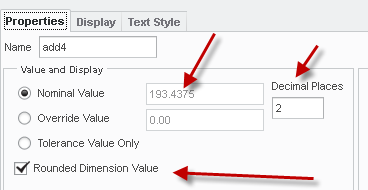
Rounding, well, my suggestion is to look at the properties in the drawing and see if the rounding box is checked.

PTC definitely changed the settings so rounding became default at one point. There are config options to control this

1 reply

StephenW23-Emerald IIIAnswer
23-Emerald III
March 16, 2017

Color schemes can be different but I suspect the red dimension are "locked" sketcher dimensions. 'Locked' as in they can't be changed by dragging.

Rounding, well, my suggestion is to look at the properties in the drawing and see if the rounding box is checked.

PTC definitely changed the settings so rounding became default at one point. There are config options to control this

wfalco16-PearlAuthor
16-Pearl
March 16, 2017

Yeah ...looks like the check box for rounding does impact the outcome. I kinda like this. I think? So dimensions are show and I can control the places on the drawing....and the model remains as it was. However - I am getting the red dimensions. I went into the model and selected them all - then unlocked - then regenerated. There does not seem to be a consequence in doing this? They are now blue. I'll have to see how this plays out. Thanks for the suggestions Stephen!

wfalco16-PearlAuthor
16-Pearl
March 16, 2017

I hear you. It has me thinking as well.

You can uncheck the box and it will round. Then your stuck with .1875 being .19 for example. You'd have to manually re-establish it at .1875.

One thing I did not check....if it changes the model while doing it in the drawing. This does make it a good thing if someone is detailing the drawing, and the model is locked. Seems like a win win?

But - there is always the places vs the tol intent. Sometimes things are what they are to be symmetrically correct.