16-Pearl
March 16, 2017
Solved

Dimension Round Off

  • March 16, 2017
  • 1 reply
  • 8397 views

All,


In CREO 3.0 M020...


I have a part in a drawing. I rounded down the decimals in the drawing. When I return to the model, the dimensions are rounded down per attachment "dim1" in red. In attachment "dim2", I click the dimension and it shows it's unrounded value. First of all.....the dimensions are in red. If I regenerate, they remain red. I guess I am used to the round off forcing the dimensions to be finalized per attachment "dim 1" after a regenerate in say WF5, the last release I worked in. What's the deal? Have I changed them or not? I like the idea of a show dimensions that are allowed to be shown 2 place on the drawing but remain it's logical 3-4 place in the model I think. However I imagine it would get into "what is your true tolerance intent?" Confused. Maybe it's too early still?


WayneF 

Best answer by StephenW

Color schemes can be different but I suspect the red dimension are "locked" sketcher dimensions. 'Locked' as in they can't be changed by dragging.

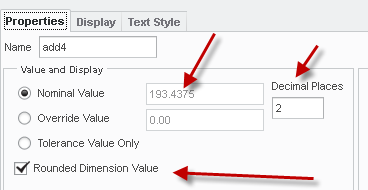
Rounding, well, my suggestion is to look at the properties in the drawing and see if the rounding box is checked.

PTC definitely changed the settings so rounding became default at one point. There are config options to control this

1 reply

StephenW23-Emerald IIIAnswer
23-Emerald III
March 16, 2017

Color schemes can be different but I suspect the red dimension are "locked" sketcher dimensions. 'Locked' as in they can't be changed by dragging.

Rounding, well, my suggestion is to look at the properties in the drawing and see if the rounding box is checked.

PTC definitely changed the settings so rounding became default at one point. There are config options to control this

wfalco16-PearlAuthor
16-Pearl
March 16, 2017

Yeah ...looks like the check box for rounding does impact the outcome. I kinda like this. I think? So dimensions are show and I can control the places on the drawing....and the model remains as it was. However - I am getting the red dimensions. I went into the model and selected them all - then unlocked - then regenerated. There does not seem to be a consequence in doing this? They are now blue. I'll have to see how this plays out. Thanks for the suggestions Stephen!

23-Emerald III
March 16, 2017

Yes, it definitely changes the model on a shown dimension. So if you wanted your model to be .1875 and you change the drawing to 2 places (not rounded), your model is now .19.

For a locked model (not locked dimension), you wouldn't be able to change the .1875 shown dimension on the drawing. The shown dimension belongs to the model which is locked.

I like having rounding options, I just want to make sure I understand exactly what is happening and what is default AND that it doesn't change from release to release.