
1-Visitor
April 23, 2015
Solved

Display Skeleton Geometry in Creo View

  • April 23, 2015
  • 4 replies
  • 6400 views

I have a large assembly with several sub-assemblies. Each subassembly contains a skeleton model. Some of these skeleton models have geometry representing space claims. If I open any of the skeleton models by itself, the geometry is displayed. If I open an assembly containing the skeleton, the geometry is not displayed. How can I make the skeleton geometry display in the assembly?


This thread is inactive and closed by the PTC Community Management Team. If you would like to provide a reply and re-open this thread, please notify the moderator and reference the thread. You may also use "Start a topic" button to ask a new question. Please be sure to include what version of the PTC product you are using so another community member knowledgeable about your version may be able to assist.
Best answer by llie

Bryan,

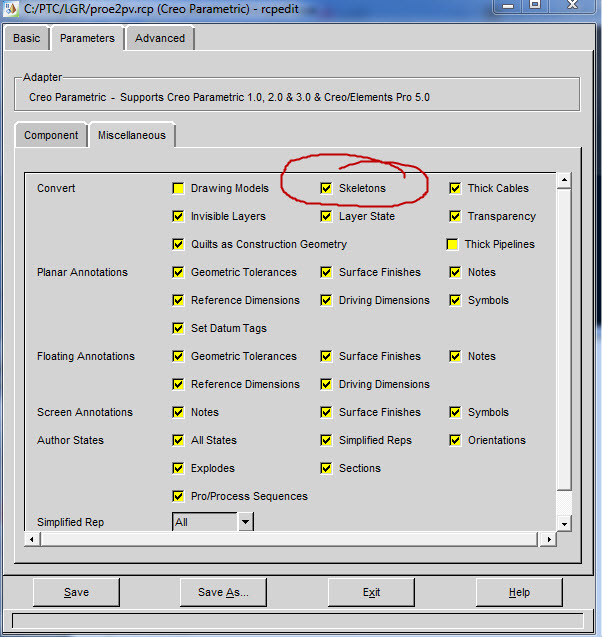
How are you creating the Creo View files? If you are creating them thru a CAD Worker that has Creo View Adapters set up to automatically create your viewables, you need to look at the recipe file and make sure that Skeletons is selected.

PV.jpg

If you are doing a Save As from Creo, then you need your admin to add the following to the export_pvs.rcp in loadpoint\text\prodview location.

adapter/convSkeleton=1

Lance

4 replies

1-Visitor
April 24, 2015

The boss is at a remote location and not a Creo user. He needs to be able to see all of the design, including our space claim, dummy models. Does anyone know how to make the skeleton part geometry show up in a Creo View assembly?

1-Visitor
April 29, 2015

What is your layer configuration?

1-Visitor
April 29, 2015

In Creo Parametric, I see the geometry just fine. In Creo View I can see the geometry in the part by itself, but not in an assembly containing the skeleton.

2015.04.29-10.22.54 Screen Capture.jpg

2015.04.29-10.25.03 Screen Capture.jpg

1-Visitor
May 1, 2015

Does anyone have any ideas on how to fix this?

1-Visitor
May 1, 2015

Update:

I have seen skeleton geometry, shown in an assembly, in Creo View, in a Google Chrome browser. So, I know it can be done. I cannot duplicate the result in IE or Chrome.

llie17-PeridotAnswer
17-Peridot
May 4, 2015

Bryan,

How are you creating the Creo View files? If you are creating them thru a CAD Worker that has Creo View Adapters set up to automatically create your viewables, you need to look at the recipe file and make sure that Skeletons is selected.

PV.jpg

If you are doing a Save As from Creo, then you need your admin to add the following to the export_pvs.rcp in loadpoint\text\prodview location.

adapter/convSkeleton=1

Lance

1-Visitor
May 4, 2015

Thanks Lance!