
1-Visitor
October 16, 2013
Question

Drawing Layers not working and what does this mean?

  • October 16, 2013
  • 2 replies
  • 6794 views

Hi, I am using Creo 1 M40.


My drawing views are having issues with layers not working. I try and hide a layer and the features/curves do not hide. I have tried to associate the view with other views, 3D model, etc...but the layers/features will not hide as they should.


I did this "Check Display Status" and here is what it is telling me. What is this Recommended Action all about?

I have tried to use all the Update options in the menu ribbon as seen in the photo. Nothing has helped with the layers.


Anyone with the same issues and/or have some solutions for me?


Thanks,
Peter
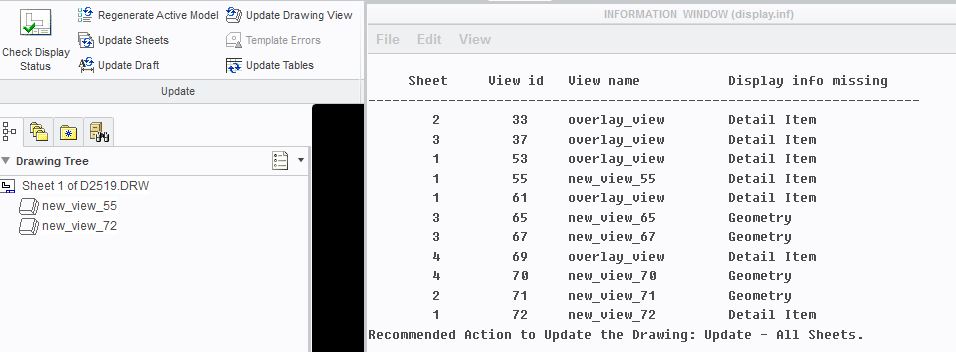
 

views.JPG


This thread is inactive and closed by the PTC Community Management Team. If you would like to provide a reply and re-open this thread, please notify the moderator and reference the thread. You may also use "Start a topic" button to ask a new question. Please be sure to include what version of the PTC product you are using so another community member knowledgeable about your version may be able to assist.

2 replies

23-Emerald III
October 16, 2013

The "check display status" has to do with updating the drawing sheets or views, usually nothing to do with layers. We have our config.pro option "auto_regen_views" set to NO for performance purposes on large assemblies.

As far as layers go, make sure you don't have the view set so it has it's own layers. I usually do this by pushing the arrow next tot he model name in the layer tree and looking for views that have a green border (instead of blue). Those with green borders control their layers independently. Those with blue borders use the drawing layers.

layer.jpg

23-Emerald III
October 16, 2013

Seems I was really cryptic in my answer. The 'check display status' is usually model changes that don't show on the drawing views yet. You can update the drawing views or the sheet to fix those. You can also set auto_regen_views in your config options to YES (which is the default) and it should keep your drawing up to date but might give you performance issues with large assemblies or drawings.

Peter11-VisitorAuthor
1-Visitor
October 16, 2013

Thanks for the explaination. I didn't even notice the green vs blue borders. All my views are green and independant. I have tried to make dependent and then back to independant....nope.

21-Topaz II
October 16, 2013

There was a bug in Proe where some items that were turned off by layers show up again. This seemed to mostly affect curves and isometric views. The work around was to go to the layer dialog, then the tools menu (wrench & hammer icon) and select 'Drawing Layer Status'. You do not need to change any options, simply displaying the dialog would force the curves to display right.

This was in WF5 or maybe WF4. I'm not sure when it got fixed, it may still exist in Creo 1 Parametric.

Peter11-VisitorAuthor
1-Visitor
October 16, 2013

Thanks, but it doesn't seem to work! I was hopeful.