3-Newcomer
October 9, 2024
Solved

Hatching error in drawing (Creo 10)

  • October 9, 2024
  • 5 replies
  • 2382 views

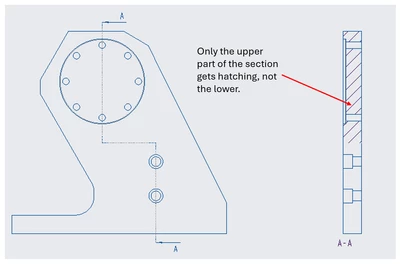
Hi I'm trying to create an offset section (See the pic attached). While showing the section on drawing, I'm not getting the hatch properly. 
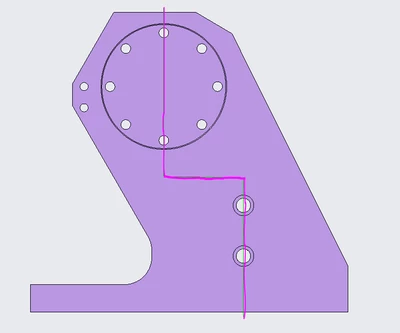
MS_11123744_0-1728473968243.png

MS_11123744_1-1728474184224.png


Best answer by MartinHanak

Hi,

the problem can be "model related".

Suggestion: Create simple test model and try reproducing the problem on it. In case of success upload it.

5 replies

16-Pearl
October 9, 2024

You are in the wrong forum.


PTC has two CAD systems:    Creo+ and Creo Parametric    and     Creo Elements Direct.


Which makes it confusing.


More, for Creo Elements Direct:

- The 3D software name is Modeling, and

- The 2D software name is Drafting.


For Creo+ and Creo Parametric, use only this tab:

KotomEng_0-1728496083348.png


You should move your post to this community to have a better chance to get an answer.


MohanS3-NewcomerAuthor
3-Newcomer
October 14, 2024

Sorry. I was new. Anyways it has been partially resolved. I'll post there from next time.

23-Emerald III
October 9, 2024

I built an offset section in Creo 9.0.9.0 and Creo 11.0.0.0 and both displayed the cross hatching as expected.

What build of 10 are you using?

MohanS3-NewcomerAuthor
3-Newcomer
October 14, 2024

Hi Ben, it is 10.0.4.0

There is a solution I posted in martin's comment sections below. Thanks. 

24-Ruby III
October 10, 2024

Hi,

the problem can be "model related".

Suggestion: Create simple test model and try reproducing the problem on it. In case of success upload it.

MohanS3-NewcomerAuthor
3-Newcomer
October 14, 2024

Thanks Martin!

I tried recreating a similar section in another simple model, just to check if the issue is with Creo settings or something. But it worked there.

Strange! I don't know what's wrong in the model, but I found an interim solution: 


It works when I create the section before hole featues.

MohanS_1-1728884042275.png


MohanS_2-1728884153160.png

MohanS_3-1728884223106.png


Dale_Rosema
23-Emerald III
23-Emerald III
October 10, 2024

Try moving the bottom hatch line .001" left or right and see if that works.

MohanS3-NewcomerAuthor
3-Newcomer
October 14, 2024

Thanks Dale, but I tried the same. It did not help. There is a solution I could manage to find. (Please see Martin's trailing comments)

4-Participant
June 27, 2025

moved from Creo 8 to 10, the drawing mode is absolute garbage, can we get the menu driven options back?  The hatching is awful, can't export a hatch from one drawing anymore it seems.  When moving a sybmol, where the heck is on entity moved to, I don't see it anywhere!  Why do they keep changing and wanting everything to be ribbons and symbols, just absolute trash, the memory seems to be less as well, drawings and assy's just show up blank and you have to close and reopen creo.  Decent eng laptop as well and it was not an issue in creo 8