tbraxton
22-Sapphire II
22-Sapphire II
January 30, 2024
Solved

How to build a search query to find sketcher dimensions or relations in a part?

  • January 30, 2024
  • 2 replies
  • 2525 views

Creo 7.0.10


Does anyone know how to search for sketcher dimensions or relations using the search tool? I am debugging a model with sketcher relations. I know there are two relations in the model that are sketcher relations from reviewing the message log of the part. Any search tool query that would identify the sketch or feature that is using the sketcher relations would make my life easier when dealing with these.


tbraxton_0-1706585834875.png


Do not use sketcher relations unless there is no other way to capture the design intent required. It makes debugging models convoluted. The only sketch relation that is unavoidable that I am aware of is when the trajpar parameter is used in a sweep and needs to be controlled with a relation. There may be others, if you know of one or more post it here for reference.

Best answer by MartinHanak

Hi,

I "developed" following procedure a couple of minutes ago.

My model
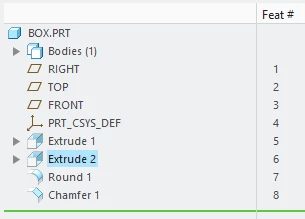
MartinHanak_0-1706604126611.png

When I display Feature information related to Extrude 2 in browser, I can see following information.

MartinHanak_1-1706604224167.png

Following trail code selects Feat # 6, displays Feature information, saves information into z6.html file and clears selection buffer.

~ Command `ProCmdMdlTreeSearch`
~ Select `selspecdlg0` `RuleTab` 1 `Misc`
~ Select `selspecdlg0` `RuleTypes` 1 `#`
~ Input `selspecdlg0` `ExtRulesLayout.ExtBasicNumbLayout.BasicNumberStart` `6`
~ Update `selspecdlg0` `ExtRulesLayout.ExtBasicNumbLayout.BasicNumberStart` `6`
~ Activate `selspecdlg0` `EvaluateBtn`
~ Activate `selspecdlg0` `ApplyBtn`
~ Activate `selspecdlg0` `CancelButton`
~ RButtonArm `main_dlg_cur` `proe_win` 9 1150 529 0 4 1393 956 1920 1200 47510
~ Timer `UI Desktop` `UI Desktop` `popupMenuRMBTimerCB`
@ sel_rmb_cmds 1
~ RButtonDisarm `main_dlg_cur` `proe_win` 9 1150 529 0 256 1393 956 1920 1200 47840
~ Exit `main_dlg_cur` `proe_win` 9 1150 529 0 4 1393 956 1920 1200 47853
~ Close `rmb_popup` `PopupMenu`
~ Trail `MiniToolbar` `MiniToolbar` `UIT_TRANSLUCENT` \
`NEED_TO_CLOSE`
~ Command `ProCmdInfoFeature@PopupMenuGraphicWinStack`
~ Command `ProCmdBrowserSave`
~ Update `file_saveas` `Inputname` `z6`
~ Activate `file_saveas` `OK`
~ Activate `main_dlg_cur` `Sst_bar.n_sels_show_bin` 1
~ PopupOver `main_dlg_cur` `sstbar_popup` 1 `Sst_bar.n_sels_show_bin`
~ Open `main_dlg_cur` `sstbar_popup`
~ Close `main_dlg_cur` `sstbar_popup`
~ Activate `main_dlg_cur` `buffer_clean`


So I generated trail file (trail_feature_info_02.txt attachment) containing the above code for all 8 features.

Then I played this trail file in Creo.

8 html files were created

I opened them in Notepad++ and searched sd2 string in all files.
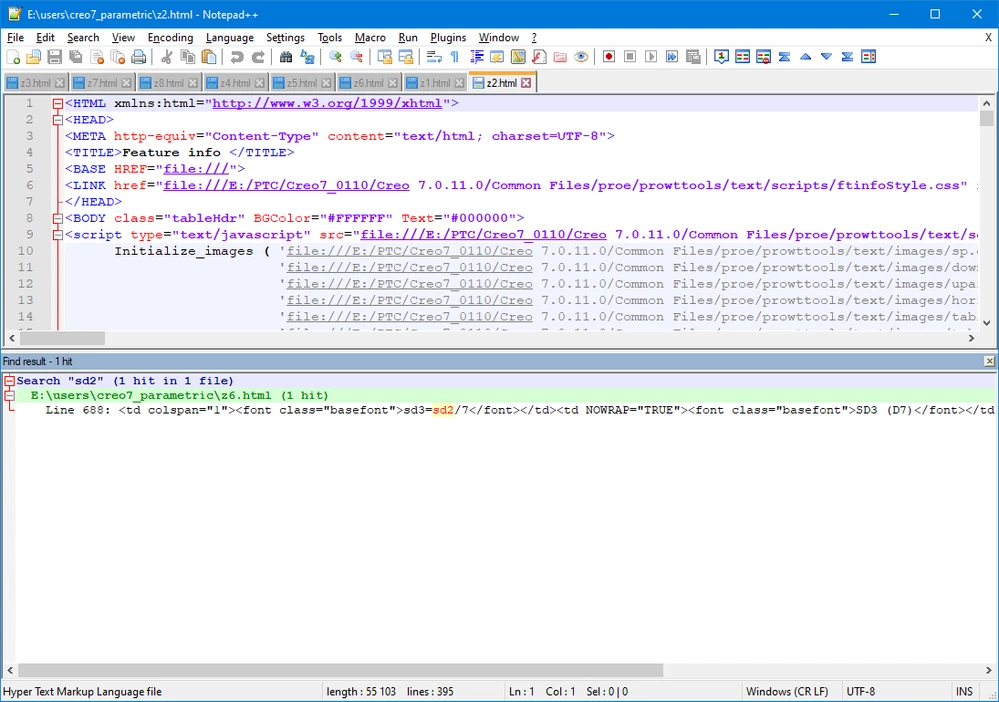
MartinHanak_2-1706604712022.png

Now I know that section relation sd3=sd2/7 is included in Feat # 6.

 

2 replies

24-Ruby III
January 30, 2024

Hi,

I "developed" following procedure a couple of minutes ago.

My model

MartinHanak_0-1706604126611.png

When I display Feature information related to Extrude 2 in browser, I can see following information.

MartinHanak_1-1706604224167.png

Following trail code selects Feat # 6, displays Feature information, saves information into z6.html file and clears selection buffer.

~ Command `ProCmdMdlTreeSearch`
~ Select `selspecdlg0` `RuleTab` 1 `Misc`
~ Select `selspecdlg0` `RuleTypes` 1 `#`
~ Input `selspecdlg0` `ExtRulesLayout.ExtBasicNumbLayout.BasicNumberStart` `6`
~ Update `selspecdlg0` `ExtRulesLayout.ExtBasicNumbLayout.BasicNumberStart` `6`
~ Activate `selspecdlg0` `EvaluateBtn`
~ Activate `selspecdlg0` `ApplyBtn`
~ Activate `selspecdlg0` `CancelButton`
~ RButtonArm `main_dlg_cur` `proe_win` 9 1150 529 0 4 1393 956 1920 1200 47510
~ Timer `UI Desktop` `UI Desktop` `popupMenuRMBTimerCB`
@ sel_rmb_cmds 1
~ RButtonDisarm `main_dlg_cur` `proe_win` 9 1150 529 0 256 1393 956 1920 1200 47840
~ Exit `main_dlg_cur` `proe_win` 9 1150 529 0 4 1393 956 1920 1200 47853
~ Close `rmb_popup` `PopupMenu`
~ Trail `MiniToolbar` `MiniToolbar` `UIT_TRANSLUCENT` \
`NEED_TO_CLOSE`
~ Command `ProCmdInfoFeature@PopupMenuGraphicWinStack`
~ Command `ProCmdBrowserSave`
~ Update `file_saveas` `Inputname` `z6`
~ Activate `file_saveas` `OK`
~ Activate `main_dlg_cur` `Sst_bar.n_sels_show_bin` 1
~ PopupOver `main_dlg_cur` `sstbar_popup` 1 `Sst_bar.n_sels_show_bin`
~ Open `main_dlg_cur` `sstbar_popup`
~ Close `main_dlg_cur` `sstbar_popup`
~ Activate `main_dlg_cur` `buffer_clean`


So I generated trail file (trail_feature_info_02.txt attachment) containing the above code for all 8 features.

Then I played this trail file in Creo.

8 html files were created

I opened them in Notepad++ and searched sd2 string in all files.

MartinHanak_2-1706604712022.png

Now I know that section relation sd3=sd2/7 is included in Feat # 6.

 

24-Ruby III
January 30, 2024

trail file for 200 features generated using Excel and Notepad++ attached.

Patriot_1776
22-Sapphire II
February 6, 2024

'Morning Tom!


I actually use sketcher relations for things like when I have a parameter driving a sketch or wanted to control the sketch itself in real time while I'm in there.  So, not all the time, but often enough.  Guess I've not run into a problem where I had issues with relations like that.  Best of luck!