
7-Bedrock
December 23, 2020
Solved

How to check the tangency of all the surfaces in a model.

  • December 23, 2020
  • 2 replies
  • 2292 views

I have created a model of hydraulic component using surfacing (Boundary blend).

Can anyone let me know any feature/way which helps to check the tangency of all the surfaces? or spot the edges where surfaces are not tangent.

I would appreciate your help.
Best answer by tbraxton

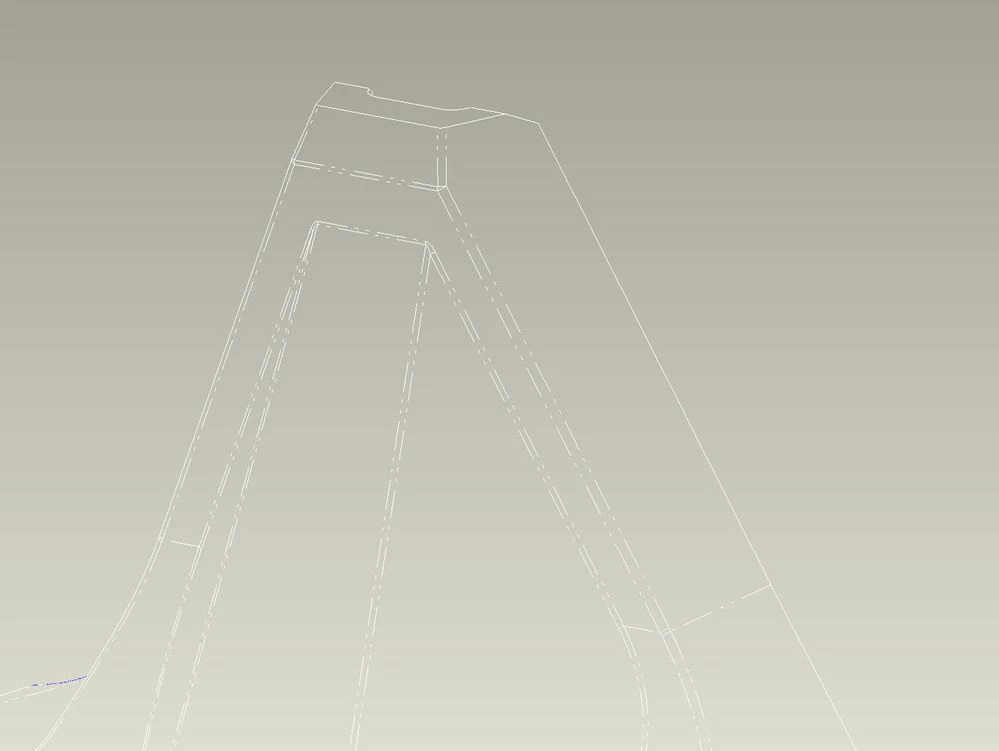
The easiest way to check is to set the tangent edge display to dimmed or phantom line and view the model in wireframe. Using the entity display controls in the File-> Options window change the tangent edge display type.  If you do not have contrast with the background change the model color to improve visibility. Once you find non tangent edges you would need to dig into the features and look at the edge connections to investigate.


Tangent edges displayed as phantom linessTangent edges displayed as phantom liness

2 replies

tbraxton
22-Sapphire II
tbraxton22-Sapphire IIAnswer
22-Sapphire II
December 23, 2020

The easiest way to check is to set the tangent edge display to dimmed or phantom line and view the model in wireframe. Using the entity display controls in the File-> Options window change the tangent edge display type.  If you do not have contrast with the background change the model color to improve visibility. Once you find non tangent edges you would need to dig into the features and look at the edge connections to investigate.


Tangent edges displayed as phantom linessTangent edges displayed as phantom liness

17-Peridot
January 7, 2021

The Creo Connection Analysis Tool provides the ability to check multiple types of connections for surfaces/quilts or solid geometry. After the Connection Analysis Tool is open, right click multiple times on your model until the desired geometry highlights or right click>pick from list>Surf/Quilt/SolidGeom. Check out this video - https://www.youtube.com/watch?v=QlRaRPiAiD0.


Creo Connection Analysis Tool.jpg