
1-Visitor
June 12, 2017
Solved

How to clip parts that lie across cross section planes?

  • June 12, 2017
  • 3 replies
  • 5079 views

In Wildfire 4, after I created a cross section, I could activate that cross section and Wildfire 4 would hide all components that were fully on the clip side of the cross section plane. Wildfire 4 would also clip any parts that had material on both sides of the cross section plane, so that only material left on the unclipped side stayed visible. So I could set a cross section, activate it, and see half of a given part, or see inside a hollow part.
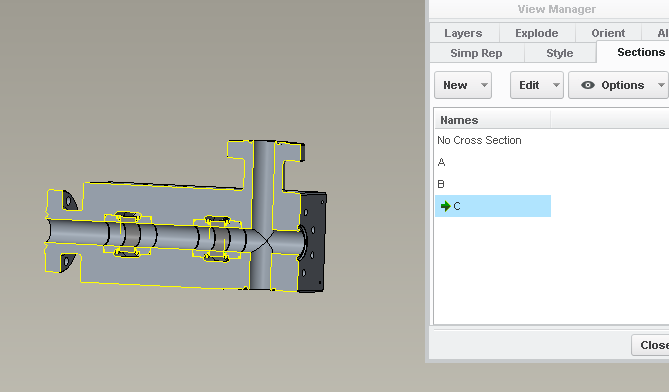
In Creo 3.0, if I activate a cross section I see the outline/crosshatching showing where there is material at that plane, and components entirely on the clip side still disappear, but any components with material on both sides of the clip plane remain unclipped. Is there a way to clip components that cross a cross section plane so I can “see inside” or see more than the 2D outline and hatching?


Basically, if I had a tire with embossed writing inside one sidewall and set a cross section through the midplane of the tire (perpendicular to its axis), WF4 would let me see the inside of the sidewall because it would hide the other half of the tire, while it looks like CREO3 will only show a hatched outline of the hub and tread superimposed on a view of the outside of the tire - I'd need a cut plane right at the writing for it to show up in the xsec outline.
Best answer by StephenW

I don't think there is anything different from x-sections in wf 4 vs. creo 3 as far as the way they work. Maybe if you take a screenshot of what you are seeing it might help diagnose the problem

If I was guessing, I think you have a video card driver issue.

3 replies

StephenW23-Emerald IIIAnswer
23-Emerald III
June 12, 2017

I don't think there is anything different from x-sections in wf 4 vs. creo 3 as far as the way they work. Maybe if you take a screenshot of what you are seeing it might help diagnose the problem

If I was guessing, I think you have a video card driver issue.

dbasile1-VisitorAuthor
1-Visitor
June 12, 2017

First pic, outside of part.Outside.png

Second pic, wildfire xsecWF4xsec.png

Third pic, creo 3 xsec CR3xsec.png

It appears that it only does this for shaded views. wireframe/no hidden seems to work better, as here:CR3xsec_wireframe.png

So for evaluation as I work, I guess wireframe/no hidden helps. But for presentations or showing others the current state of a part, wireframe takes more mental effort than something shaded that has been cut in half.

23-Emerald III
June 12, 2017

There shouldn't be any difference. I assume it's a solid, not a surface. Surface model would need to be set to include surfaces in the x-section.

I assume it's just a planar x-section. Not zone or anything like that.

I don't think there is any config options for this functionality. What you are seeing is not normal.

Is it only this part or all parts/assemblies?

1-Visitor
June 13, 2017

Domenic,  and Stephen,

I'm not sure,  but could this have something to do with the "Show Section" option in the "options" drop down? (or one of the other options?)

I ask this because in Domenic's Creo3 picture,  there is a "football" icon next to the section name that does not appear in any of the other snapshots in this thread...

Good Luck

Bernie

Bernie Gruman

Owner / Designer / Builder

www.GrumanCreations.com

23-Emerald III
June 13, 2017

I tested that because I thought the same thing. That only shows the x-hatching in the 3d.

dbasile1-VisitorAuthor
1-Visitor
June 14, 2017

I updated my graphics driver after reading this: Solved: Creo 3.0 M070 Section tool does not clip away mate... - PTC Community, and the problem went away. Thank you, Stephen, you were right even at the beginning. I just have an aversion to installing files if I don't need to. I'd rather change a setting that I can change back later if necessary. Martin, you should get points for an "assist" to my question.

Solved.png

Thank you everyone! My life is much easier now.

23-Emerald III
June 14, 2017

Anytime.  Graphics card issues are always suspected in odd or unexpected functionality cases.