1-Visitor
March 17, 2014
Solved

How to make a datum tag on a diameter

  • March 17, 2014
  • 2 replies
  • 30326 views

Hello,


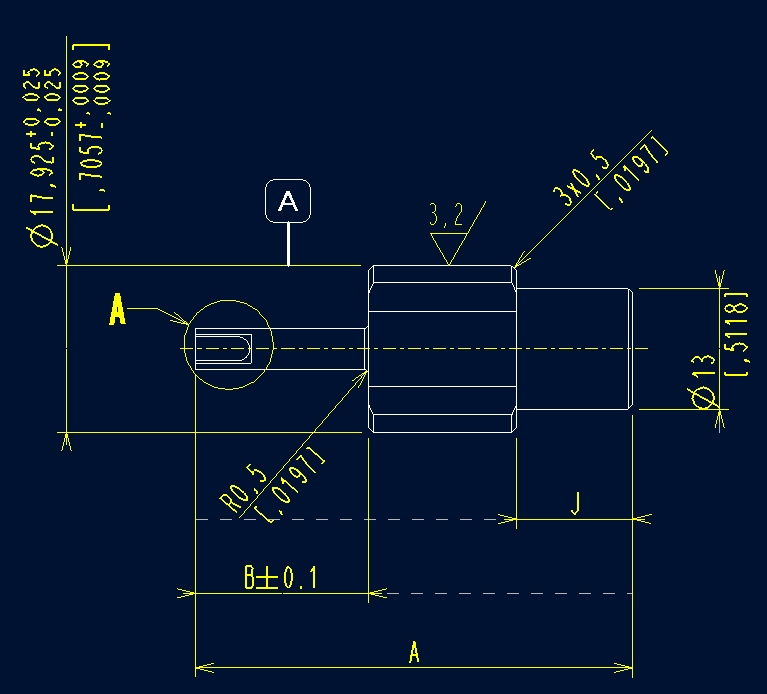
Please help me with creating a datum tag on a diameter according to the pic below (creo parametric 1.0)
 

2014-03-17_171843.jpg

Thnx for help

Best answer by neomechanikos

If you haven't already, set your GTOL standard to ASME or ISO, etc. in the detail options. If you don't have the right standard set you won't be able to create it. File-->Prepare-->Drawing Properties-->Detail Options. Go to "gtol_datums". (Creo 2.0)

  1. Create a model datum. In drawing: Annotate tab-->Model Datum pulldown-->model datum axis...follow the prompts to create it on a cylinder. If you already have a datum, select it then right click --> properties. I usually create mine in the model and not the drawing.
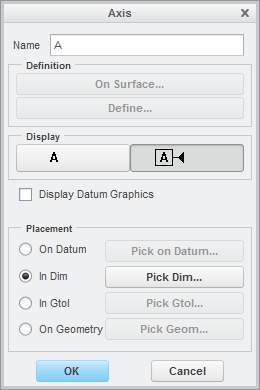
  2. In the new window, give it a name, select the display button on the right then select "In Dim", hit the button to the right and select your diameter dimension.
  3. Now you can move your datum to where you want it. If you do the above in the model, don't forget to show the datums in your drawing.

I've never had a problem with datum tags but I skipped Creo 1.0

dtag1.jpg

dtag2.jpg

2 replies

17-Peridot
March 17, 2014

The idea is that you re-assign datum tags to features you want them to be assigned to. in this case, you want a leader. I find the implementation cumbersome and I choose to use a customized symbol instead.

See this discussion. You will find a generic symbol attached to the last post.

Datum Tag problem

17-Peridot
March 17, 2014

And be careful with Creo 1 and datum tags. FILE OFTEN! While moving the tags around the screen will freeze and then cause a fatal crash.

1-Visitor
March 17, 2014

If you haven't already, set your GTOL standard to ASME or ISO, etc. in the detail options. If you don't have the right standard set you won't be able to create it. File-->Prepare-->Drawing Properties-->Detail Options. Go to "gtol_datums". (Creo 2.0)

  1. Create a model datum. In drawing: Annotate tab-->Model Datum pulldown-->model datum axis...follow the prompts to create it on a cylinder. If you already have a datum, select it then right click --> properties. I usually create mine in the model and not the drawing.
  2. In the new window, give it a name, select the display button on the right then select "In Dim", hit the button to the right and select your diameter dimension.
  3. Now you can move your datum to where you want it. If you do the above in the model, don't forget to show the datums in your drawing.

I've never had a problem with datum tags but I skipped Creo 1.0
dtag1.jpg

dtag2.jpg

1-Visitor
October 18, 2017

Trying to convert datum planes to tatum tags in creo 4.0 as per ASME, i did not find the option, is any one help me..

Thank you

17-Peridot
October 23, 2017

In Creo 4 you don't have the option to convert datum planes to datums.

You need to use annotation datums which are not actually features.
