
1-Visitor
October 10, 2014
Solved

How to make a tab your default tab Creo 2.0

  • October 10, 2014
  • 1 reply
  • 2426 views

I have created a tab for my model and drawing and I want Creo 2.0 to open up with this tab pre-selected not like the layouts tab in the drawings.


This thread is inactive and closed by the PTC Community Management Team. If you would like to provide a reply and re-open this thread, please notify the moderator and reference the thread. You may also use "Start a topic" button to ask a new question. Please be sure to include what version of the PTC product you are using so another community member knowledgeable about your version may be able to assist.
Best answer by Mahesh_Sharma

AJ,

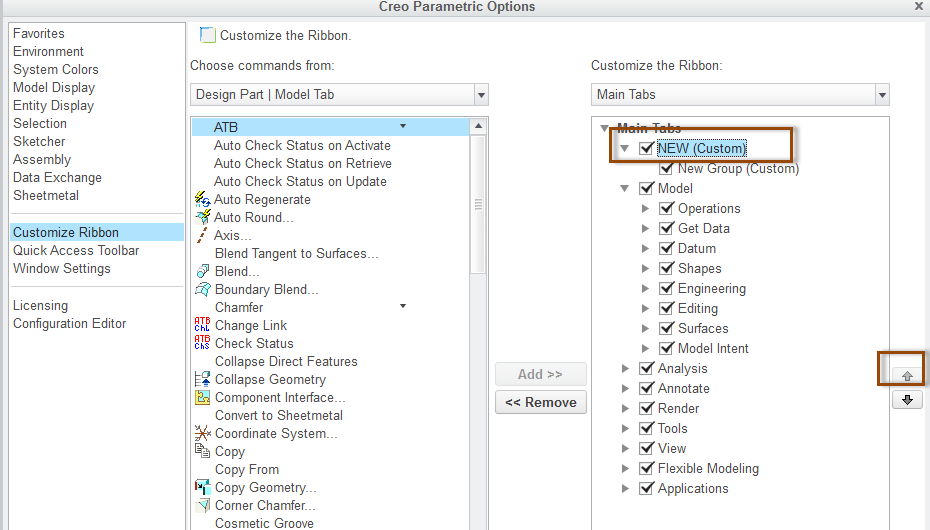
First tab in UI will be default active tab. Move up the custom tab when customizing the ribbon.

UI.png

1 reply

Mahesh_Sharma
22-Sapphire I
October 10, 2014

AJ,

First tab in UI will be default active tab. Move up the custom tab when customizing the ribbon.

UI.png

asmith-31-VisitorAuthor
1-Visitor
October 15, 2014

I already have the new tab I created as the first one on the list, but for instance when I open a drawing the layout tab is always the tab that is activated when any drawing is opened. Now I want to make the new tab I created to be the initial tab that is activated when I open a drawing, model, or assembly. How do I go about doing this?

Mahesh_Sharma
22-Sapphire I
October 15, 2014

You need to add that tab in all modes seperately i.e. Part, assembly and drawing