
6-Contributor
June 26, 2025
Solved

How to make zero values blank in repeat region, Creo 8

  • June 26, 2025
  • 2 replies
  • 986 views

Hello, I have an assembly that uses various lengths of raw materials. To indicate this, we list the raw material and what length to cut it at. We currently have it set up so there is a special "CUT_LENGTH" parameter controlling this length for use with pre-defined flexibility and easy identification of the driving parameters. We want to add this parameter to the CONFIG.PRO file so we don't have to manually add this parameter in every time. When doing so, it defaults to a "0" when not being used (which is ok) but it shows this in the custom BOM, so we end up having to delete the parameter per each item. Instead of having to delete said parameter, we would like to have it controlled by a relation that basically says "If the cut length is equal to 0, replace the value in the BOM with a blank, but leave all other cells alone." I can get it to edit all of the cells where the "CUT_LENGTH" parameter is shown at once with no issue. But when I try to specify which ones to change/leave alone, Creo blanks out all of the information to the left side of the cell. I am not sure if I am missing something or this can't be done etc.? Any help would be greatly appreciated.

Starting point of table:
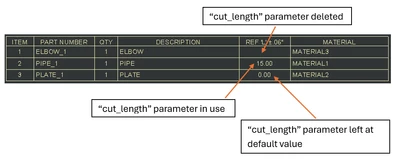
JS_12786992_4-1750948399998.png


Driving symbols of table:

JS_12786992_5-1750948877378.png


Table & Relations when Controlling all instances of "cut_length":
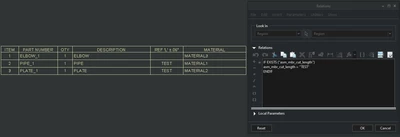
JS_12786992_1-1750947380715.png


Table & Relations when trying to control specific instances of "cut_length":
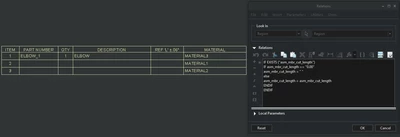
JS_12786992_2-1750948040685.png


Best answer by MartinHanak

Hi,


some comments follow ...


asm_mbr_cut_length in repeat relations

  • Creo is trying to find parameter named CUT_LENGTH in every assembly component model (in part or in subassembly)
  • Question: What Type is assigned to the CUT_LENGTH parameter? String or Integer or Real Number ?


Relations (I guess CUT_LENGTH parameter type is Real Number):

rel_cut_length=" "

IF EXISTS ("asm_mbr_cut_length")

  IF asm_mbr_cut_length > 0

    rel_cut_length=asm_mbr_cut_length

  endif
endif


Table cell contents ... &rpt.rel.rel_cut_length

2 replies

kdirth
21-Topaz I
21-Topaz I
June 26, 2025

You need to change the relation name in the table to a User Defined name and use that name in the relation.

e.g.  asm_mbr_cut_length_tbl


IF EXISTS ("asm_mbr_cut_length")

IF asm_mbr_cut_length=="0.00"

asm_mbr_cut_length_tbl=" "

else

asm_mbr_cut_length_tbl = asm_mbr_cut_length

ENDIF

ENDIF

There is always more to learn.
6-Contributor
June 26, 2025

kdirth,


I tried doing what you had said, and now it is deleting both rows entirely.


JS_12786992_2-1750955031878.png


JS_12786992_1-1750954838262.png


kdirth
21-Topaz I
21-Topaz I
June 26, 2025

Is your parameter "cut_length" in the parts?  If so, remove "ASM_MBR_" from the name in the relation.

There is always more to learn.
24-Ruby III
June 27, 2025

Hi,


some comments follow ...


asm_mbr_cut_length in repeat relations

  • Creo is trying to find parameter named CUT_LENGTH in every assembly component model (in part or in subassembly)
  • Question: What Type is assigned to the CUT_LENGTH parameter? String or Integer or Real Number ?


Relations (I guess CUT_LENGTH parameter type is Real Number):

rel_cut_length=" "

IF EXISTS ("asm_mbr_cut_length")

  IF asm_mbr_cut_length > 0

    rel_cut_length=asm_mbr_cut_length

  endif
endif


Table cell contents ... &rpt.rel.rel_cut_length

6-Contributor
June 27, 2025

MartinHanak,  I finally got it to work. with a combination of what you had replied and kdirth had said. Thank you for your help!
