11-Garnet
August 26, 2025
Solved

How to separate this two sweep in one PRT

  • August 26, 2025
  • 6 replies
  • 1663 views

I have a prt(V Belt) where i need to have two models, but show just one at time.
Usually we use one for 3d and one for 2d, but in this case i just wanna have like "one button" where i show one or another. 
Creo 8.0.9.0 
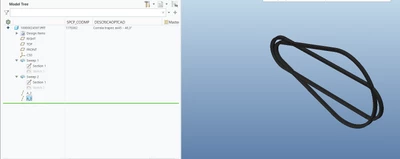
ND_10940562_0-1756219034737.png


Best answer by kdirth

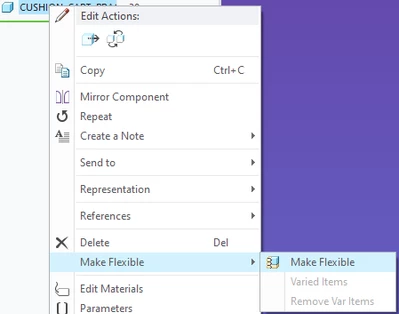
RMB menu:

kdirth_0-1756302461705.png


6 replies

16-Pearl
August 26, 2025

Hi @ND_10940562 


Perhaps you are interested in a Family Table, where you can have one instance for Sweep 1 and another instance for Sweep 2.  This would not be a "one button" solution but it would allow you to show one at a time.


Even creating a mapkey to switch between which is shown/suppressed would require 2 mapkeys, one in each direction.


Hope this helps

Mike

tbraxton
22-Sapphire II
22-Sapphire II
August 26, 2025

Flexible modeling tools (component flexibility) is a good method to deal with this. It was added to Creo to deal with this scenario of morphing parts. This would use a single model. If you are not familiar with this functionality, you can learn more here.


Edit for the support link to the Component flexibility page. I had initially linked to the wrong support page for this topic.


About Flexible Components

kdirth
21-Topaz I
21-Topaz I
August 26, 2025

What is your end goal?


I would guess you want a part print model and an assembly model all-in-one.


For this I would use flexibility in the assembly. 

  1. Suppress the as assembled sweep in the part model. 
  2. In the assembly use Flexibility to suppress the part sweep and resume the as assembled sweep.
  • The sweeps can also be predefined for flexibility in the part model.
There is always more to learn.
11-Garnet
August 26, 2025

I would like to do it by representation, but I couldn’t.

From what I’ve seen, many people use the Family Table, but I didn’t want to, so I wouldn’t need to create a new code.

Basically, the straight V-belt is the purchased part.

The belt with different diameters is the assembled part and also how it appears in the drawing (DRW).

I’m not sure if I have a license to use Creo Flexible Models. I tried to make the belt flexible, but the option didn’t appear for me.

23-Emerald III
August 26, 2025

you should be able to create a part simplified rep, turn one off  and turn another one off. 

Then in the assy, you can use the part rep in an assy rep, one for each.

11-Garnet
August 26, 2025

But the problem is that, when using representation, I see two options:

1. Keep both sweeps active in the master rep and create one representation as "purchased" and another as "3D".
However, whenever I open the PRT, it opens in the "master rep" and shows both versions at the same time (like in the screenshot I sent).

2. In the master rep, leave one of the sweeps suppressed and then create another representation.
But in this other representation, I can’t "unsuppress" the sweep.

24-Ruby III
August 27, 2025

Hi,

your model can contain 2 bodies.

Body 1 ... 1st sweep

Body 2 ... 2nd sweep

You can put bodies in layers and hode/show them according your needs.


11-Garnet
August 27, 2025

Thats great option thank you


5-Regular Member
August 27, 2025
11-Garnet
August 27, 2025

thats great never seen that
i took me a while to find that is in the regenereate area 
thank you