
1-Visitor
June 28, 2020
Solved

How to specify rotation direction in cylinder joint
  • June 28, 2020
  • 1 reply
  • 3327 views

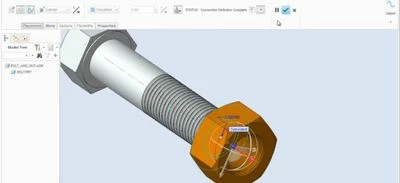
Screenshot_20200628-144521_YouTube.jpgAs soon as we apply I cylinder joint in assembly a rotation  direction is is start showing. How can we specify the direction like clockwise and anticlockwise or change the default rotation direction.

Best answer by KenFarley

I think I understand what you're asking...

When the angle is not in the clockwise/counterclockwise direction I want, I just enter a negative value for the angle, and it changes the "default" direction. I believe the initial angle is oriented with respect to the normal vector of the geometry being used to define it.

Hopefully your situation is as simple as I'm assuming.

1 reply

KenFarley21-Topaz IIAnswer
21-Topaz II
June 29, 2020

I think I understand what you're asking...

When the angle is not in the clockwise/counterclockwise direction I want, I just enter a negative value for the angle, and it changes the "default" direction. I believe the initial angle is oriented with respect to the normal vector of the geometry being used to define it.

Hopefully your situation is as simple as I'm assuming.

1-Visitor
July 1, 2020

Thanks a lot for the reply. I was doing the same in my assembly but for some reason, it was not working. Then I again set up the assembly and my problem solved.  With your reply, I understood that I was doing the correct thing and arranged the assembly again and problem solved. 

I will share some work here later. Well, thanks a lot again for the reply.


1-Visitor
July 11, 2020

Here is the video where I was trying to create a bolt and nut animation. And nut was rotating in the wrong direction.  After filling the angle with the negative value the problem solved.