1-Visitor
May 11, 2022
Solved

I'm trying to make a stent but creo identifies wrong sketch as a shape

  • May 11, 2022
  • 8 replies
  • 8253 views

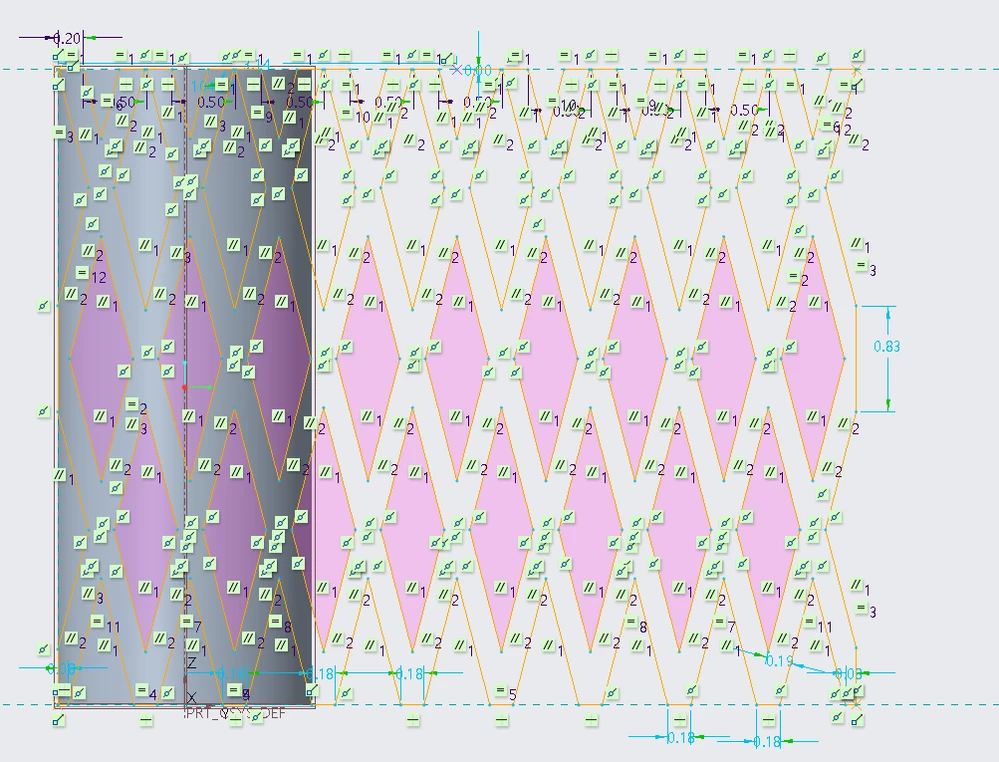
I'm designing a simple stent but it seems that the sketch i put as a hole identifeis a shape. is there a way in creo to set which is a shape and which is a hole?



이미지_2022-05-11_135353145.png

Best answer by MartinHanak

Hi,

maybe your sketch is not correct -OR- is too complex.
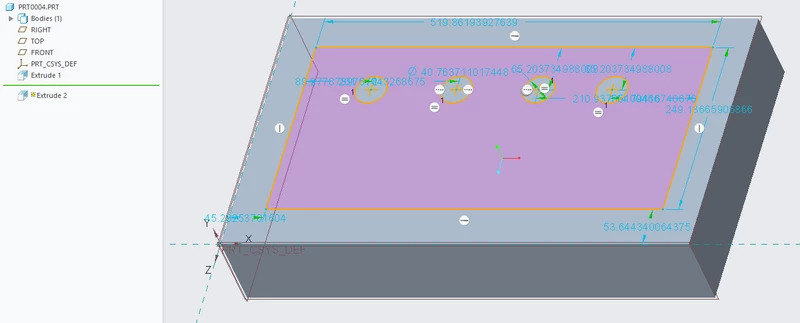
MartinHanak_0-1652251913163.png

In my test part Extrude 2 feature is set to remove material. Pink color is assigned to removed area (this meas hole).
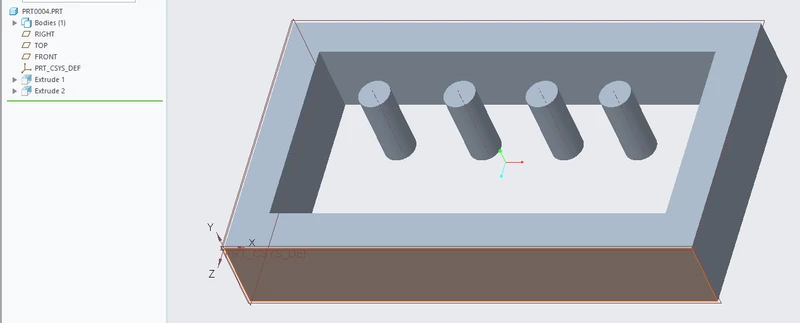
MartinHanak_1-1652252068596.png


8 replies

24-Ruby III
May 11, 2022

Hi,

maybe your sketch is not correct -OR- is too complex.

MartinHanak_0-1652251913163.png

In my test part Extrude 2 feature is set to remove material. Pink color is assigned to removed area (this meas hole).

MartinHanak_1-1652252068596.png


1-Visitor
May 18, 2022

I know this is one of the solutions but im trying to do the stent without removing the area

19-Tanzanite
May 11, 2022

I think the problem is in this area of your sketch:

pausob_2-1652260793125.png


This works:

pausob_0-1652260677473.png

and this does not:

pausob_1-1652260700609.png


1-Visitor
May 18, 2022

those 2 look close but they aren't connected thx for the possible solution tho

19-Tanzanite
May 18, 2022

Well then, if they're not connected, then the area marked with "X" not "enclosed", is it?

pausob_0-1652851729786.png

That explains why it isn't shaded...

tbraxton
22-Sapphire II
22-Sapphire II
May 11, 2022

That sketch is not a good idea in Creo Parametric. Complex sketches (too many entities) will surely cause issues with your models as you work with them. Multiple simple sketches are almost always better than one complex sketch.


The geometry shown appears that it could be patterned readily.

Patriot_1776
22-Sapphire II
May 11, 2022

Well, thank God that at least Creo isn't "identifying" as "Non-Binary"...  LOL

kdirth
21-Topaz I
21-Topaz I
May 11, 2022

Interesting challenge.  Here is my quick attempt at creating it with patterns.

There is always more to learn.
1-Visitor
May 18, 2022

I'm on creo 6 and I guess it's not compatible sad...

kdirth
21-Topaz I
21-Topaz I
May 18, 2022

It is done in Creo 7.0.

I created a cylinder surface and made a feature measurement of the circumference.  Then I made a relation to that measurement.

kdirth_0-1652876096340.png

kdirth_1-1652876391762.png

I then made a wrap feature using relations to control the width of the pattern.  I sketched one pattern of diamonds with the distance between centers being the circumference divided by 2 times the number of patterns desired.

kdirth_2-1652876863549.png

Next I trimmed the cylinder surface by each of the diamonds.

kdirth_3-1652877248686.png

I then patterned each feature.  The wrap was patterned by axis the desired number over 360 degrees.  The rest of the features are then patterned by reference.

kdirth_5-1652877513100.png

Lastly I thickened the surface.

kdirth_6-1652877629508.png


There is always more to learn.
Patriot_1776
22-Sapphire II
May 17, 2022

I tend to do complicated sketches myself, especially when I'm doing a curve in a skeleton part as a layout for all the parts in an assembly.  For something like this, if this is actually what you want in a single sketch, the best thing to do is mirror the geometry.  It might take several mirrors, but it does simplify things because then the only constraints you have besides the constraints for the original diamonds, are symmetric constraints.  You don't have a ton of parallel, equal, perpendicular constraints etc.  It helps the system out quite a bit.


If you try that, post up your experience.  I'm on Creo 4, so, if you're on a higher version, I'd like to know if the sketcher behavior is the same.

1-Visitor
May 18, 2022

I just started creo so i dont know much but ill definately try it

Patriot_1776
22-Sapphire II
May 18, 2022

Ok, this was kinda interesting, the first one in a long time besides the colander (that I haven't had time to get to, so, I just spent an hour or so on it.  You can modify the "OD" dimension from 1" to 3" (as shown) and it will actually make the stent shorter, which is what I believe it actually does at installation when you inflate it.  The model is simple and seems pretty robust.  The sketch LOOKS complicated, but as I said, using the mirrors it's actually pretty simple.  It's not going to be perfect, since in Creo you can't "distort" or "stretch" material in the way it does in real life, but it should be very close.  I used a midplane/neutral axis for the spinal bend so that the thicken would cut the distortion in half from that midplane on out to the outer and inner surfaces, it of course could be changed to the outer or inner dia by changing the sketcher relations etc.  I also made the part flexible so that you could change the "OD" dimension at assembly and it would stretch and shorten compared to the static geometry (1" dia and 3" length).  This is a Creo 4 file so pretty much everyone should be able to play with it except for "student edition" users.


Have fun y'all!

2022-05-18_STENT-01_VIEW-01.png


Thoughts, comments?

Patriot_1776
22-Sapphire II
May 18, 2022

Ok, since I can't edit the comment above to replace the .zip file, I'll re-do it.  It turns out Creo is kinda stupid, and that vertical line in front prevents you from adding a round there, it kinds treats it as a single part, but with 2 co-planar ends.  Retarded.  I looked at doing a Toroidal Bend, but it failed every time.  Honestly, I've NEVER had luck with that feature, dunno how it's actually used (IF it's used).  So, what worked was having to add 2 extra features, splitting the quilt into 2 halves, then re-merging them, right BEFORE the thicken feature.  Stoopid, but now, Creo treats it as a single continuous solid, instead of split.  PTC should fix that so that if you use a spinal bend and the ends are coincident, it at least gives you the option to make it a "loop".  Wheird.  Hate having to add a couple of features that I would consider not needed if Creo joined the ends (like the toroidal bend that didn't work), but whatever.  So, here's the new Creo file.


19-Tanzanite
May 19, 2022

Nice work @Patriot_1776  Your model is very flexible - as it should be 🙂 

It works well out-of-the-box and design intent is captured very well.

The split/re-merge technique to "weld" the spinally-bent surface is also a fine work-around that results in neat and tidy geometry  that is easy to manipulate; for example, rounded:

pausob_0-1652920659093.png

Thanks for posting it.  I'm adding this one to my reference library.

Patriot_1776
22-Sapphire II
May 23, 2022

Sure seems like a popular thread.  Wonder how many people downloaded my model, considering the minimal amount of feedback...?

Patriot_1776
22-Sapphire II
May 24, 2022

Anyone?  Bueller?

kdirth
21-Topaz I
21-Topaz I
May 25, 2022

Liked the adjustability of the model.  Made me think about how I could incorporate that adjustability into my model.  Haven't taken the time to make the changes to my model yet.


BTW, Ferris is sick and my best friend's sister...

There is always more to learn.