

I made a list of the questions that most puzzled me ! Anyone help ?
I made a list of the questions that most puzzled me, I would be grateful if anyone could help me with any of the following questions, Thanks
############################################
■Q1: How to scale each body or surface individually? The "operations/scale model" command will scale the entire part (all body). The "Flexible modeling/Move feature" command only can move and rotate.
############################################
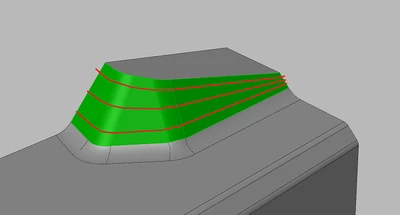
■Q2:How to get these three red isolines from green surfaces?
The command under the"Style/curve from surface" only can extract isoline from a single surface, just a partial segment. Even if I extract isolines face by face, the joints of partial segments must be out of alignment
############################################
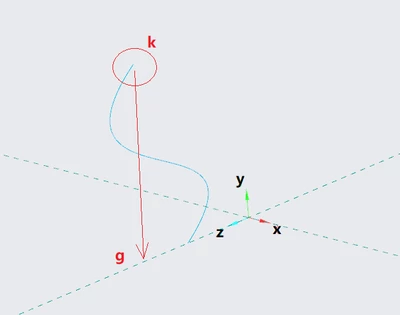
■Q3:XZ plane is my sketch plane, How to get the“perpendicular projection point” G of point K ? I can't do that by the snap tool or project tool. (the "S" shape curve is drawn in the ZY sketch plane )
############################################
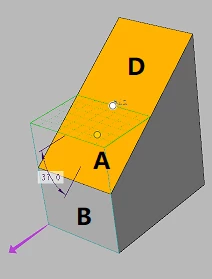
■Q4:face A and face B and edge C are generated by a simple curve and the "Divide surface" command,
If I want to use the draft feature, it will not succeed. What is the reason for this failure?
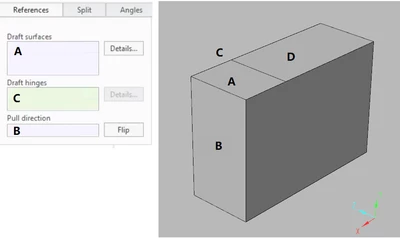
I thought I was going to get this
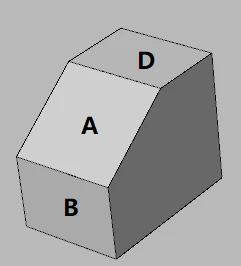
But what I got is this actually
############################################
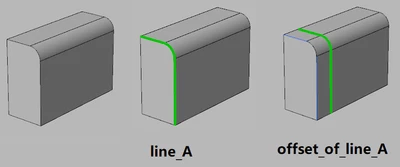
■Q5:How to convert the "offset of line_A" into a common or normal curve like an editable freehand curve?
############################################
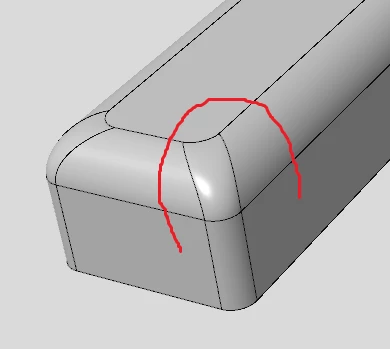
■Q6:How to draw a freehand curve fitting the surface of the model?
The command under the"Style/curve/COS" only can draw on a single surface, it can not across adjacent surfaces.
############################################
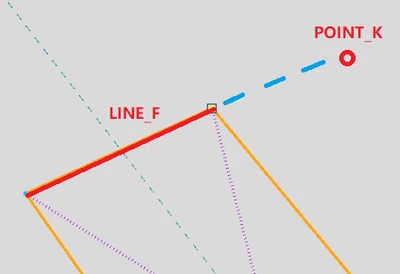
■Q7:Under sketch mode, How to turn on the "extension-snap" of LINE_F to make the POINT_K pass through or make it align the extension?
############################################
■Q8:An old school problem, How to reduce the zoom speed(or zoom steps) when I zoom the view just using the mouse wheel? (I know shift+wheel or ctrl+MMB can help)