11-Garnet
April 16, 2024
Solved

IFX - 2D preview and 3D preview does not show correct representation of Screw/bolt.

  • April 16, 2024
  • 1 reply
  • 2400 views

Hi,

I'm using IFX to create my own custom library.

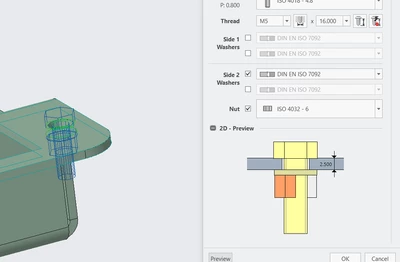
I've added a few hardware components. Everything is operating OK, but when I use IFX, I do not get the accurate representation of Screw in 2D and 3D previews.

Images are included here.

Please let me know if anyone knows how to fix this.

I did not find anything related to apperances settings in help section.

With custom lib - 
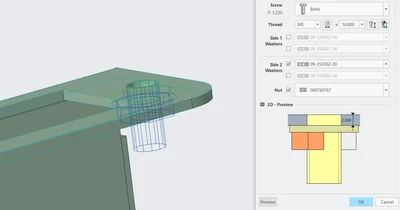
VP_10265412_0-1713272510252.png


With Default Library 

VP_10265412_1-1713272580109.png


Best answer by OliverGräbner

IFX only has previews for the predefined types.


If you have a type, which is not available, you can use type 99.

For this type only the maximum outline will be shown.

Together with your own screw icon you will have a good preview.


Hope this will help.


1 reply

17-Peridot
April 16, 2024

Hi,


you will find an image with all required dimesions to paint the 2D/3D preveiw correctly.


Here an example for SCREWTYPE 01

Image: SCREWTYPE 01 (ptc.com)

In addition you will find a folder for each type inside the ifx installation folder:

C:\Program Files\PTC\Creo 10.0.4.0\Common Files\ifx\parts\ifx_fastener_templates\screws\screw_01


Allways make sure, that the columns listed inside the *.dat template file are also available in your customized file.


If there are any concerns, please upload your bolts.dat file and I will have a look at it.


11-Garnet
April 17, 2024

I am looking for some custom representation here like below image , 

VP_10265412_0-1713342841063.png


I checked to use custom screw using Screw type 50 , also created prt file and template for Screwtype 50 ( attached here, just remove .txt extension). But I guess Creo does not allow custom views like above image and only allow standard Hex head/round head views.

17-Peridot
April 17, 2024

IFX only has previews for the predefined types.


If you have a type, which is not available, you can use type 99.

For this type only the maximum outline will be shown.

Together with your own screw icon you will have a good preview.


Hope this will help.