
11-Garnet
April 14, 2023
Solved

Is it possible to import drawing page creo into a new drawing Creo Parametric but with associativity

  • April 14, 2023
  • 2 replies
  • 5024 views

Is it possible to import drawing page creo into a new drawing Creo Parametric but with associativity ?
With the functionnalitie import drawing/data is possible to insert a specific page in my new drawing buth without link
Maybe option or specific application?
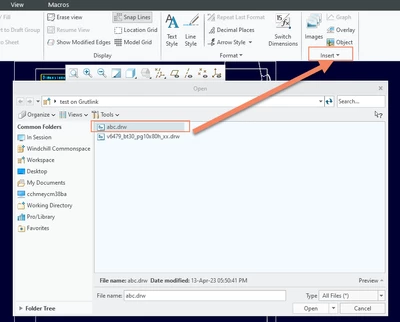
AC_10460838_0-1681467049677.png

Thank you


Best answer by tbraxton

If I understand correctly then no, this is not supported with the import function in drawing mode. When you import a Creo drawing it creates a snapshot of the drawing at the time of import and is not associative with the source drawing after import.


The solution to your scenario is to import the source drawing after it is modified to reflect the latest version of the source drawing. 

2 replies

tbraxton
22-Sapphire II
22-Sapphire II
April 14, 2023

Yes, this is possible. If you have an existing Creo drawing you can use the import function to import the drawing to another drawing. When you do this, it will create sheets as required in the target drawing. 


When you import a Creo drawing you import the entire drawing contents (not formats), not just a single page. If you need a single page, you will need to configure that in a Creo drawing before importing it.

11-Garnet
April 14, 2023

Yes i have tested this solution but without link between 2 drawings

23-Emerald III
April 14, 2023

What "link" are you referring too. I don' t remember any references from the old drawing to the new drawing but I haven't looked for one either.

19-Tanzanite
April 15, 2023

Have you looked at the Overlay function?

pausob_0-1681523333407.png


11-Garnet
April 15, 2023

Hello

Great!!! I didn't know this function but it corresponds to my need.
Now i have 2 solutions: Overlay or use consultation functionalities in Windchill.


Thank you very much