I think the visibility controls in Creo are both extremely powerful and versatile and too hard to implement. They aren't getting any attention from PTC, however, so you have to make the most of what you've got. Thankfully, with some planning in implementing rule based layers, you can control the visibility of items on a very fine grained level.
You don't want to be creating layer rules all the time. This is something you set up in your templates and then they just do their job for you. I have a set of rule based layers that allow everything "hidable' to be hidden even when the global datum toggles on. I can then use my layers to show only what I want to see. I can also create other new layers with groups of items to make them all visible at once.
On your original question, if you have the datum features on their master layers and hidden, you can then put individual datum features on an additional layer to control them independently. You would then use the isolate command to force that layer to be visible. Maddeningly, the isolate command is only available in the drop down menu in the layer tree:
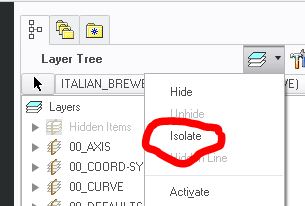
Again, it's more complex than it needs to be, but it works well once you've mastered it.
I've attached a PDF that I created some time ago that explains how we use rule based layers here which may be of help to you. There's also an old blog post here:
Understanding Layers in Pro/ENGINEER - Design Central Inc.

