
cancel
Showing results for 
Search instead for 
Did you mean: 
cancel
Showing results for 
Search instead for 
Did you mean: 

The PTC Community will be on read only status starting March 23rd in preparation for moving our platform to a new provider. Read more here

Translate the entire conversation x

Isometric Orient View with Z axis at the top

PI_10580016
2-Explorer

Isometric Orient View with Z axis at the top

I am using Creo Parametric Release 12.4 and Datecode12.4.0.0

I would like to create a new oriented view with an isometric orientation.
Currently, the default Isometric view has the Y‑axis along the upper side.
I want to rotate it so that the Z‑axis is along the upper side instead
1 REPLY 1
tbraxton
22-Sapphire II
(To:PI_10580016)

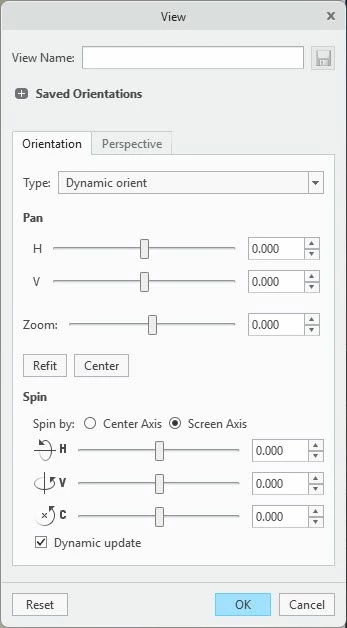
Refer to the solution in this thread for details on the angles required for orientation:

 https://community.ptc.com/t5/3D-Part-Assembly-Design/Iso-views-based-on-Default-Orientation/m-p/924392 


See my post with the values to get Isometric projection relative to current view; TLDR

ISOMETRIC (proportion of the three sides is 1:1:1):
The horiz. angle should be the ArcSin of (1/(Sqrt(3))) = 35.26439 degrees
This is equal to ArcSin of Tan(30).
Due to rounding errors in Pro/E you can better use the value: 35.26379


Orient your model in an orthographic view with the desired axis orientation. Use view dynamic orient to put the model in ISO view and then save the view.


2026-03-03_11-10-49.jpg

========================================
Involute Development, LLC
Consulting Engineers
Specialists in Creo Parametric
Announcements


NEW Creo+ Topics: Real-time Collaboration

Top Tags