
4-Participant
February 14, 2024
Question

Issues with note on angle

  • February 14, 2024
  • 1 reply
  • 1402 views

Hello,

I am using Creo 7.0.9.0 and have a question about adding notes to a drawing. I am creating GD&T feature control frames by manually typing it into a note so I can put it on an angle, as seen below. (This was a drawing I made a while back).
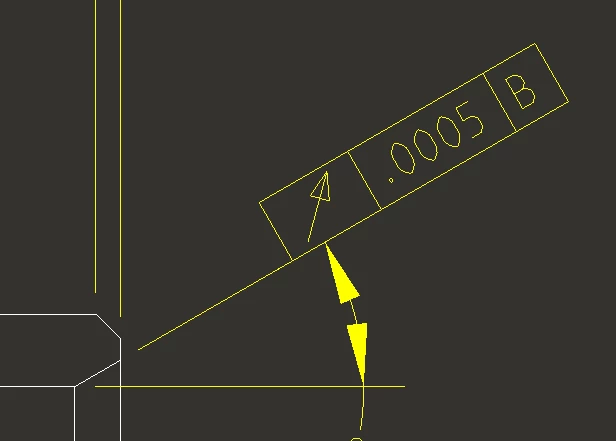
 

note no spacing.png


Now, I am trying to re-create this same thing on a new drawing, but the feature control frame is hovering above the leader line, as seen below
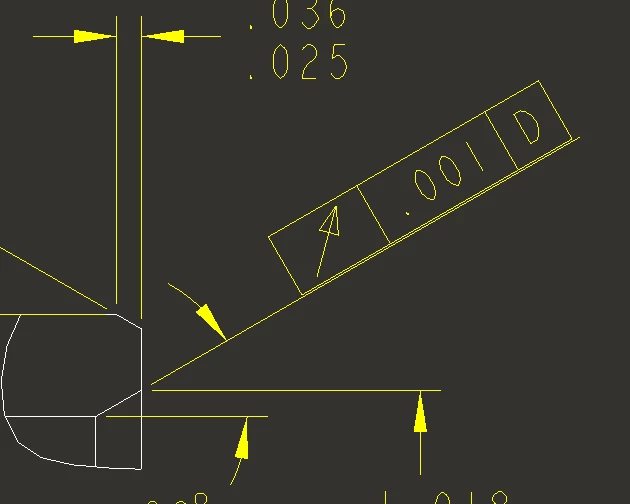
note spacing.png


I have tried to copy and paste from the old drawing to the new drawing and it still causes the 'hovering' look. I've gone through drawing properties to see if any config settings would be applicable but nothing is standing out. It appears as if something in our drawing template has changed but I'm not sure what. Would anyone be able to help me out so that there is no gap between the leader line and feature control frame?

1 reply

kdirth
21-Topaz I
21-Topaz I
February 14, 2024

Look at the line spacing factor in the format tab.

kdirth_0-1707938900497.png


There is always more to learn.
bterry274-ParticipantAuthor
4-Participant
February 14, 2024

So, that does allow me to move the feature control frame down to the line. The weird thing though is that if I go back to my old drawing, the line spacing factor setting does nothing. I can change it to any value and the feature control frame stays attached to the leader line. Would their possibly be any other setting that affects the behavior of the spacing?

Dale_Rosema
23-Emerald III
23-Emerald III
February 14, 2024

If you add a new feature control frame to the old drawing does it still work as anticipated or like the new drawing?