1-Visitor
June 6, 2018
Question

JT client initialization failed

  • June 6, 2018
  • 1 reply
  • 3739 views

Hallo community,

when I try to save an assambly in Creo Parametric 4.0 as a JT-format

the following Error pops up:
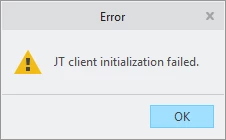
2018-06-06 10_38_59-Error.png

Does anyone knows how to solve this problem?

 

1 reply

24-Ruby III
June 6, 2018

Hi,


were you able to save JT file in previous Creo versions (Creo 3.0, 2.0) ?

Does your license contains Interface for JT module (code 263) ?

tlangner1-VisitorAuthor
1-Visitor
June 6, 2018

Hey Martin,

yes, my license contains the JT module (code 263).

It's the first time trying to save an assambly as JT, so I never tried in Creo 3.0, 2.0.

Regards,

Tim

24-Ruby III
June 7, 2018

Hi,


the problem is related to Creo installation. During installation you have to click Customize button and select Creo Parametric Interface for JT.

jt_installation.pngWhen you do this, installer inserts JtToPro.exe into ...\Common Files\x86e_win64\obj directory.