
3-Newcomer
June 25, 2025
Question

Kelvin Lattice Structures on Creo 10

  • June 25, 2025
  • 5 replies
  • 933 views

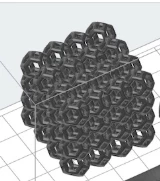
Tring to generate a Kelvin lattice structure. One that once generated cab be inserted into the lattice feature to generate various lattice's. Has anyone done this or managed to find a good method of generating one?  generated a rough wireframe but sweeps, extrudes and blends didn't seem to be the right way about it. 


Lattice i am trying to re-create can be seen in the following file https://s3.amazonaws.com/servicecloudassets.formlabs.com/media/Materials/Silicone%2040A%20Resin/lattice_watch_Silicone40A_STLs.zip
MR_7385901_0-1750852388828.png


5 replies

tbraxton
22-Sapphire II
22-Sapphire II
June 25, 2025

Creo 6+ does support the use of a custom lattice. Have you followed the process outlined in the link below?


To Create Custom Lattice


If you are asking how to create solid geometry for a cell, then sweeps could be used to create cell the cell geometry as a solid or quilt. Planar curves can be used to define the sweep trajectories and then geometry can be swept using these curves.


tbraxton_0-1750856644153.png


tbraxton
22-Sapphire II
22-Sapphire II
July 5, 2025

You can leverage the fact that a kelvin cell can be built by using a truncated octahedron. This will quickly provide the framework to build the sweep trajectories. This is not the only way to do generate the geometry, but it is readily built in Creo. You will need to determine some relations to control the aspect ratios, but this is a geometric basis to construct the cell.


tbraxton_0-1751725430149.png


tbraxton_1-1751725501430.png


tbraxton
22-Sapphire II
22-Sapphire II
July 5, 2025

Here is a model that should support the creation of a beam lattice Kelvin cell. Try it out and report back here if it works. The cell is calculated using the edge length of a square face as shown below.


Open this model in Creo 10 and save it as a .prt file. You can then bring it in as a custom lattice; the model consists of curves only.


Curves—Creates a beam-based lattice cell. Any selectable straight curves in the cell are converted into beams.
If the part contains curves and does not contain solid geometry or quilts, then a beam-based lattice cell is created.


tbraxton_0-1751750343669.png


Marrowman3-NewcomerAuthor
3-Newcomer
July 7, 2025

How did you go about generating this ? You boggled my brain as i was trying to generate it thinking it would need to have been equation based.

tbraxton
22-Sapphire II
22-Sapphire II
July 7, 2025

Truncating an octahedron is a quick way to make the geometry in a model.

Minimal equations are used to control the edge length (a) which is the edge length of a square face:

  • In-sphere radius (center to mid-hexagonal-face): a√(3/2) = a√6/2
  • In-sphere radius (center to mid-square face): a√2

tbraxton_1-1751889532946.png


tbraxton
22-Sapphire II
22-Sapphire II
July 6, 2025

Here is an example of using the wireframe with single segment straight sweeps to make a solid geometry cell. With the intersections of the sweeps intersecting with "fish mouth" geometry at the vertices. The fish mouth intersection is easily realized by using the remove surface function in flexible modeling.


tbraxton_0-1751760900285.png


Intersections of sweeps before adding the fish mouths.

tbraxton_1-1751761101838.png


Marrowman3-NewcomerAuthor
3-Newcomer
July 7, 2025

I am finding this model does not want to accept sweeps for multiple lines that would end up interconnecting. Ale to do the squares fine and the hexagons but whenever they meet they are not working.

15-Moonstone
July 7, 2025

There is two sketchers in the Creo folder Common Files\text\lattice_template

With one of them you can create something like this

Snap-2025-07-07-016.jpg

kdirth
21-Topaz I
21-Topaz I
July 7, 2025

Create one sketch (green) to control the structure.  Second sketch (orange) is controlled by the first.  Top and bottom are sketches are at projected lines.  Side is sketch of projected lines.  Connectors (red) are curves.  Side entities would then be patterned around axis.  And finally curves would be added around equator.

kdirth_1-1751896635599.png

kdirth_2-1751896847524.png


There is always more to learn.