1-Visitor
February 11, 2024
Solved

Lines in model affecting mesh generation. Would like to merge them.

  • February 11, 2024
  • 1 reply
  • 1426 views

I have wing geometry that I would like to have as one body. There are lines traveling the span of the wing subdividing it and I would like to get rid of them if that is possible so that it is not subdivided at all. They have given me some trouble when exporting the geometry for meshing, though I'm not sure why. I would appreciate any help. I have included a picture of what I am talking about. I have shrinkwrapped the file but it still has these lines. This is Creo (8) Student Edition. 
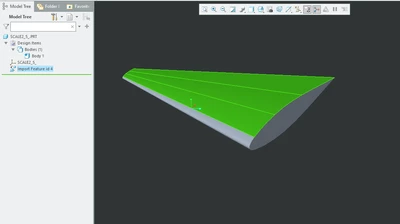
Wing.png

Best answer by tbraxton

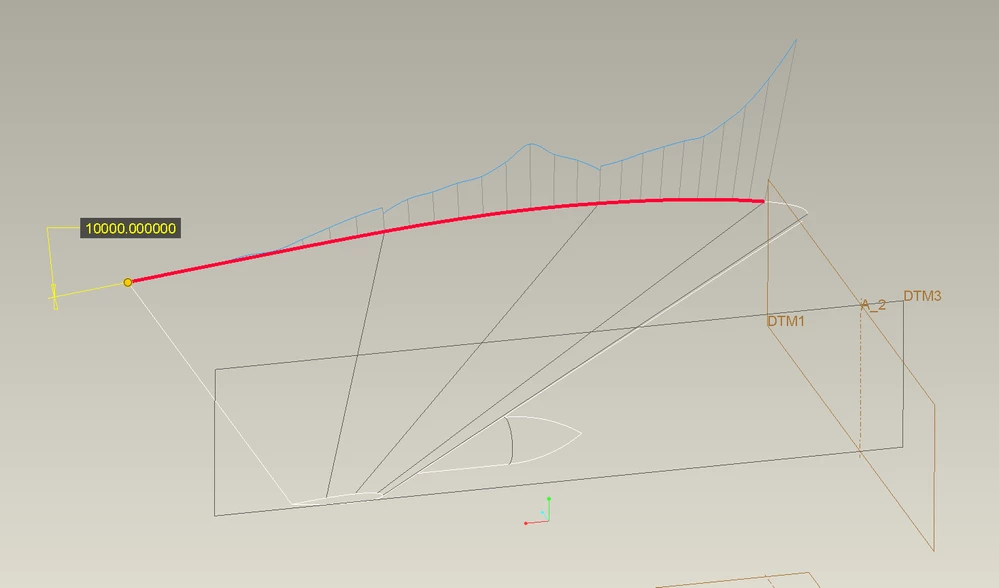
The lines are isoparms and are a result of the import geometry. The airfoil sections at the root and tip of the wing are not curvature continuous curves which is why the isoparms are present. You would need to rebuild this geometry in Creo to get rid of the isoparms.


In short, the curves used to define the surfaces are junk in the context of defining an aerodynamic surface. They are also not suitable for creating a clean four sided surface.


tbraxton_0-1707654251343.png


1 reply

tbraxton
22-Sapphire II
22-Sapphire II
February 11, 2024

Post the import source file here for review.

Those lines are most likely isoparm lines inherent to the source data you are importing. It is impossible to tell why they are in the model without access to the import data. The obvious method of correcting this is to replace the green domain shown above with a curvature continuous 4-sided surface. It is probably possible using core surfacing functions (boundary blend) and almost certainly using an ISDX surface feature.


Import the model as surfaces (not solid) and then correct the issue and then solidify the quilt yielding your body.

1-Visitor
February 11, 2024

I've attached the file to this reply. It is in .stp format initially. 

tbraxton
22-Sapphire II
tbraxton22-Sapphire IIAnswer
22-Sapphire II
February 11, 2024

The lines are isoparms and are a result of the import geometry. The airfoil sections at the root and tip of the wing are not curvature continuous curves which is why the isoparms are present. You would need to rebuild this geometry in Creo to get rid of the isoparms.


In short, the curves used to define the surfaces are junk in the context of defining an aerodynamic surface. They are also not suitable for creating a clean four sided surface.


tbraxton_0-1707654251343.png