

Patriot_1776
22-Sapphire II
September 15, 2022
Solved

Major Creo 8 issues

  • September 15, 2022
  • 2 replies
  • 4009 views

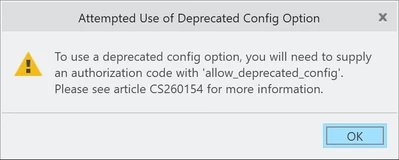
I just got Creo 8.0.5.0 loaded...aaaaand hate it.  The biggest problem is when I load my personalized config.pro file that I've used for ages I get some BS "To use a Deprecated config option..." error message, and as soon as I try and create or redefine a feature, in sketcher I get the dreaded "White Screen of Death", where I can't see ANYTHING, it's just blinding white.  When I get out of sketcher, I get the correct black background.  As it is I can't load my config.pro and so can't get my mapkeys.  Needless to say I'm extremely p!ssed.  I've had problems upgrading Creo before in the past, but nothing like the total show stopper this is.  What I might do is just make a config.pro consisting ONLY of my mapkeys and see if that works.  Way to go, PTC!


Anyone seen or have a solution for this garbage?


Thx!
Patriot_1776_0-1663261013846.png


Best answer by Patriot_1776

Well, at this point I'm not sure what, exactly, was the fix, but, what I did was take the new Creo 8 config,pro that the admins here had made, and deleted all their mapkeys and put mine in there, and also added a few of my main settings (query select, etc.), and it works.  So, there's something funny in there somewhere, and it appears that it IS definitely a config.pro issue.  I'm going to, bit by bit (step by step, inch by inch...LOL) introduce my old config.pro settings until I get that failure.  Maybe I won't, maybe simply copying the Creo 8  file then modifying it fixed the issue, but with PTC, who knows...

2 replies

15-Moonstone
September 15, 2022

I am on your side: there always have garbage in CREO and Simulate. I don't know why!

15-Moonstone
September 15, 2022

It looks like the CREO "admin" of my company can design their config.pro, with some commends that expels end user's. Whenever, I load my personal config.pro, the CREO just QUIT. â˜šī¸ So I basically can only use mouse click to operate CREO, instead of mapkeys for the time being.

Patriot_1776
Patriot_177622-Sapphire IIAuthorAnswer
22-Sapphire II
September 15, 2022

Well, at this point I'm not sure what, exactly, was the fix, but, what I did was take the new Creo 8 config,pro that the admins here had made, and deleted all their mapkeys and put mine in there, and also added a few of my main settings (query select, etc.), and it works.  So, there's something funny in there somewhere, and it appears that it IS definitely a config.pro issue.  I'm going to, bit by bit (step by step, inch by inch...LOL) introduce my old config.pro settings until I get that failure.  Maybe I won't, maybe simply copying the Creo 8  file then modifying it fixed the issue, but with PTC, who knows...

Patriot_1776
22-Sapphire II
September 15, 2022

Ok, so, it looks like one of the older settings is what COMPLETELY FUBAR's Creo, requiring a total RE-START of Creo to fix it.

That setting is:    enable_selection_glow

Do NOT use this setting!


I haven't gone all the way thru my old config.pro, so, I can't 100% that that is the ONLY problem, but I'm adding stuff from my old fil in section (User Interface, etc.) section by section, so, we'll see.  But I know for a FACT that this setting completely FUBAR's your session.  WOW!  #epicfail

15-Moonstone
September 15, 2022

At least we found a new word to google about and learnt some new knowledge. Thanks.