

Mechanism Sliding Fit Interaction
Hi all,
This is my first post on this community forum, so I apologize in advance if I'm missing anything!
I am working on an assembly where I have two parts that fit together with a small gap of 0.05mm. I am attempting to use the Mechanisms in Creo (which are apparently tedious to use in Creo compared to SW). I am using a 'Slider' constraint between two said components. I have attached a zip with part and assembly files.
The problem I am having is that despite with a 0.05mm gap, it seems like Creo thinks the parts are touching when they are not. What I mean by this is in the image below, you would think the surface highlighted in green would be flush with the one next to it. However, when I drag the components together, this is as close together as they can go!
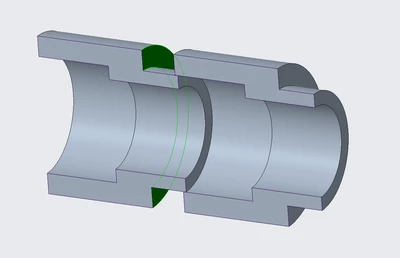
I have no clue why this is happening. I assume it's probably some setting that I did not know to change. Any help would be appreciated!
I have tried changing the diameters around, and I've found that making the gap between the two larger results in me being able to drag the components closer to be considered flush with one another.
Thank you!