4-Participant
November 22, 2023
Solved

Mirror function not working properly Creo Parametric 8

  • November 22, 2023
  • 2 replies
  • 4048 views

I am working on a model in Creo Parametric 8 Sheetmetal and having difficulty getting a feature to mirror correctly. The model is U-shaped and on one of the legs I have created 2 identical sketch forms. I then mirror the forms about a plane to the other leg. The upper form mirrors correctly, while the lower one does not. The form has an OD of 3.58 inches and when mirrored it comes out at 3.2 inches. I have tried re-drawing the feature and I have tried mirroring about a different plane. No matter what I do, nothing seems to work. Am I missing something here?


This is the original sketch form:
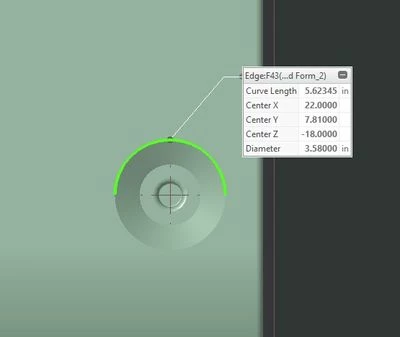
Source Dia.jpg


These are the form properties: 

Sketched Form Properties.jpg

This is what happens when I mirror, one correct one wrong:
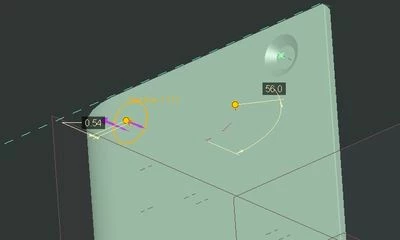
Initial result 2.jpg


When I correct the form to make it work, you can see the OD of the form is inside the OD of the sketch:
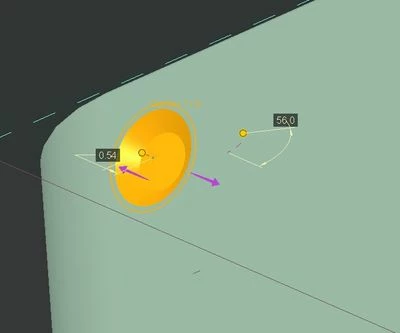
edit 1.jpg

I would like to keep the design I have if possible, it's parametrically driven and if I manually create this form on both sides of the model I will have to have twice as many parameters for placement. I'm trying to eliminate possible sources of errors like values not copying correctly in the spreadsheet. Any ideas? Thanks in advance.

Best answer by Tdaugherty

It's hard to tell from the picture but it looks like the form with the problem is close to a bend. I wonder if that is causing the difference in geometry.


If not, could you try mirroring your sketch instead of the feature? I'm assuming you mirrored the feature originally but you can also parametrically drive mirrored geometry with the mirror command in sketcher.

2 replies

16-Pearl
November 22, 2023

It's hard to tell from the picture but it looks like the form with the problem is close to a bend. I wonder if that is causing the difference in geometry.


If not, could you try mirroring your sketch instead of the feature? I'm assuming you mirrored the feature originally but you can also parametrically drive mirrored geometry with the mirror command in sketcher.

4-Participant
November 22, 2023

I'll see if I can explain it a little better, I know the screen caps aren't the best. The original forms point towards the middle of the U shape (I'll put a pic below). When I run the mirror command, the upper form mirrors and points in, the lower form points outwards, rather than inwards, if that makes sense. I have to edit the form and flip the direction of material deformation in order to get the correct directional result, though the diameter is wrong. The third picture in the original post are what it looks like when I execute the mirror command. The deformation direction is pointing in the wrong direction.


If I mirror the sketch, will I still have to go in and manually add the form? If I can get the models to work correctly, I will be using these fairly frequently for work and I won't have time to add the form every time a new design comes through. 


The forms more in the foreground are the source, the background forms are the result. 


DS_10868229_0-1700679077581.png


16-Pearl
November 22, 2023

You can disregard my comment about mirroring in the sketch. I agree with your modeling approach. In general, I create internal sketches to create features. Within the same sketch, if you draw a circle for example, you can mirror that circle about a reference within the sketch. When you exit, the sketched form command will form both circles. 


I was able to create a part that looks like yours but I wasn't able to reproduce your issue. I did find a way to get the background forms to point the wrong way. To do this, I created the first forms, mirrored them, and then flipped the original. The mirrored form didn't respect the direction change but it was both, not just the lower one. To fix it, I deleted the mirror and recreated it. Maybe this is worth a shot?


I think I'm still a little suspicious of the feature being so close to a bend but it's hard to tell without looking at your part. Can you post it?


Here is my part for reference and its model tree. The bottom surface of my U shape is the first wall feature. 


Tdaugherty_0-1700680809727.png


tbraxton
22-Sapphire II
22-Sapphire II
November 23, 2023

Your part appears to be symmetric about a mirror plane. For the part geometry you have shown, I would model half of the part in part mode (not sheet metal) and then mirror the part. Convert it to a sheet metal part when finished with the geometry in part mode.


I would do this in any case not just with your mirror issue, but because I can create that geometry faster in part mode than I could in sheet metal mode. If you do this, I am pretty confident that it will not have the issue you are facing.


To Convert a Solid Part into a Sheet Metal Part (ptc.com)