1-Visitor
December 12, 2023
Solved

Missing icons in Quick Access toolbar-Creo 7

  • December 12, 2023
  • 2 replies
  • 5411 views

Hi

I have creo 7 installed in my system. In it i am missing a set of icons in the quick access toolbar which is regularly needed for me. All my colleagues have those. i tried copying there confi.pro and other folders but nothing seemed to work. These are the icons that i need. Can anyone help?

dccb17cf-c75c-40bf-8599-b393de87ac5d.jpg

Best answer by tbraxton

I am guessing that some of those in the list on the right-hand side are mapkeys that are mapped to icons for use in the UI. This explains why you are not able to find them in the GUI.


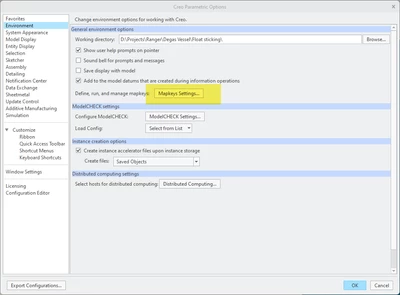
Are any of those commands found in the list of mapkeys in a Creo session that has the desired UI? You can find the mapkeys using:

 File > Options > Environment > Mapkeys Settings


tbraxton_0-1702388030422.png


2 replies

Chris3
21-Topaz I
December 12, 2023

File -> Help -> System Information -> scroll all the way to the bottom. Look for this:


==================================================
Configuration Information
==================================================

Configuration files read:

creo_parametric_customization.ui


Rename any .ui files in the list and then restart Creo and see if that fixes the issue. Not that doing this will also remove any personal customizations you have added (although you can always rename the files back).


Alternatively right click on the ribbon and click "customize the ribbon" and then search for the missing icons and add them back in through that dialog box.

tbraxton
22-Sapphire II
22-Sapphire II
December 12, 2023

Try copying the creo_parametric_customization.ui file in addition to the config from a known good environment. The UI customizations are not stored in the config.pro.


About Saving User Interface Custom Settings (ptc.com)

1-Visitor
December 12, 2023

Hi

I tried copying the creo_parametric_customization.ui file from my collegue. It still doesnt show anything in the quick access toolbar

tbraxton
22-Sapphire II
22-Sapphire II
December 12, 2023

If you have a system admin, consult them about any UI custom environment settings and how they are loaded. If not read the article I posted above about how to save UI customizations, there are multiple files that may be involved in that.


If you need to just get back to work, then do as @Chris3 suggested and customize the ribbon yourself.


If you are missing just a few commands, then just add the commands where you want them and Creo will write the creo_parametric_customization.ui to your working directory by default. Save a copy of this for reference in a safe location (not working directory) and then go back to work.