17-Peridot
November 15, 2019
Solved

ModelCHECK_parameters in Cyrillic

  • November 15, 2019
  • 2 replies
  • 2054 views

Hello everyone!


ModelCHECK does not accept model parameters in Cyrillic.
How can I fix this problem?
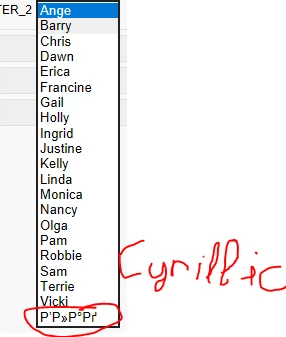
Снимок.PNG


Regards!

Best answer by VladiSlav

Hello!


I found a solution:
It is necessary to select the parameter MC_SUPPORT_LEGACY_STRING in the config_init.mc file (select "N").
Then reload Creo Parametric.
Then everything worked in my case.


Best Regards!

2 replies

Mahesh_Sharma
22-Sapphire I
November 15, 2019

@VladiSlav 

Can you share a text file with such words? Also, it will be worth looking at post https://community.ptc.com/t5/System-Administration/Work-with-existing-vowel-mutation-%C3%A4-%C3%B6-%C3%BC-%C3%84-%C3%96-%C3%9C/m-p/605956

24-Ruby III
November 15, 2019

Hi,

my suggestion ... report the problem to PTC Support.

VladiSlav17-PeridotAuthorAnswer
17-Peridot
November 16, 2019

Hello!


I found a solution:
It is necessary to select the parameter MC_SUPPORT_LEGACY_STRING in the config_init.mc file (select "N").
Then reload Creo Parametric.
Then everything worked in my case.


Best Regards!
