

ModelCheck with Assemblies/Family Tables - Which ModelCheck Mode works best?
We've been using ModelCheck in Save mode for a couple months. This more or less works the way we want except with Family Tables since the MC_ERRORS doesn't get updated on the instances. This is annoying when combined with the Windchill Gatekeeper (errors=0) - we basically have to trick Creo to regenerate the model before verifying the instances. See video below (audio may be quiet but it's there).
Rather than admitting there's a bug in software, PTC recommended we switch to a different mode that regenerates. As I look at switching modes, the ModelCheck Interactive mode with assemblies seems to check more than just the assembly - it starts checking the components within the assembly. See image below.
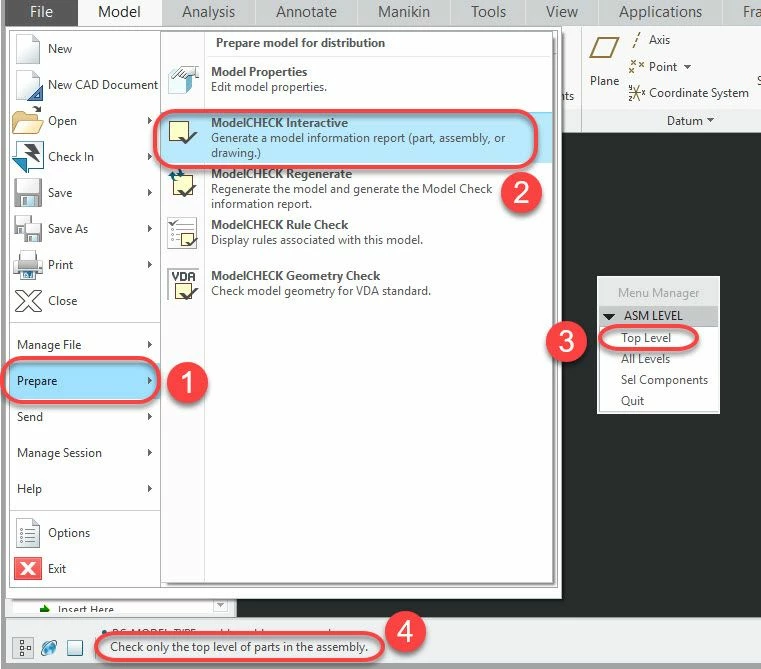
Checking lower level components is very undesirable from a PDM standpoint - the objects may already been released/locked (and in theory checked had 0 ModelCheck errors when checked in) and should not be modified. Choosing "Top Level" in Interactive mode results in local modification of many objects in the assembly and none of the other options seem to work either. ModelCheck doesn't check lower level components in Save mode. Does anyone else have this problem with assemblies or found a solution to this? Or have a preferred ModelCheck mode that works well? Maybe ModelCheck wouldn't do this if all the components had 0 MC_ERRORS but we're just getting started with ModelCheck. We're using Creo 4 M040.
Summary:
- MC Save Mode works pretty well except with updating the ModelCheck parameters for Family Table instances
- MC Interactive Mode does not work well with assemblies in a Windchill PDM environment (unless I'm doing something wrong). Is there a way not to check components in the assembly?
- Ideas? Better settings or modes to try? What are other people doing?