
12-Amethyst
December 9, 2021
Solved

ModelTree automatically adds column with simpl rep

  • December 9, 2021
  • 1 reply
  • 1934 views

Hi all,

Creo 4, M050


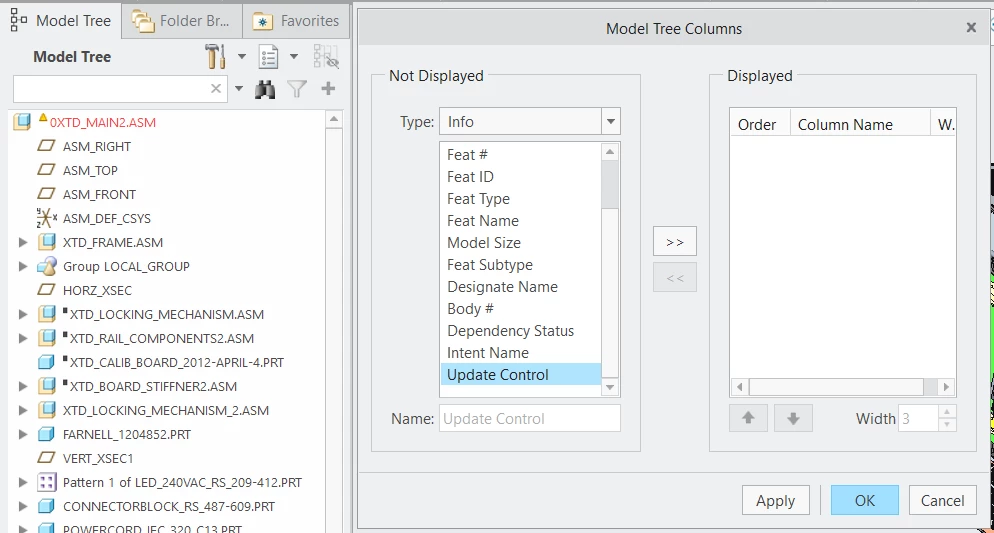
In my ModelTree configuration, I don't have any extra columns selected to be shown in the ModelTree.

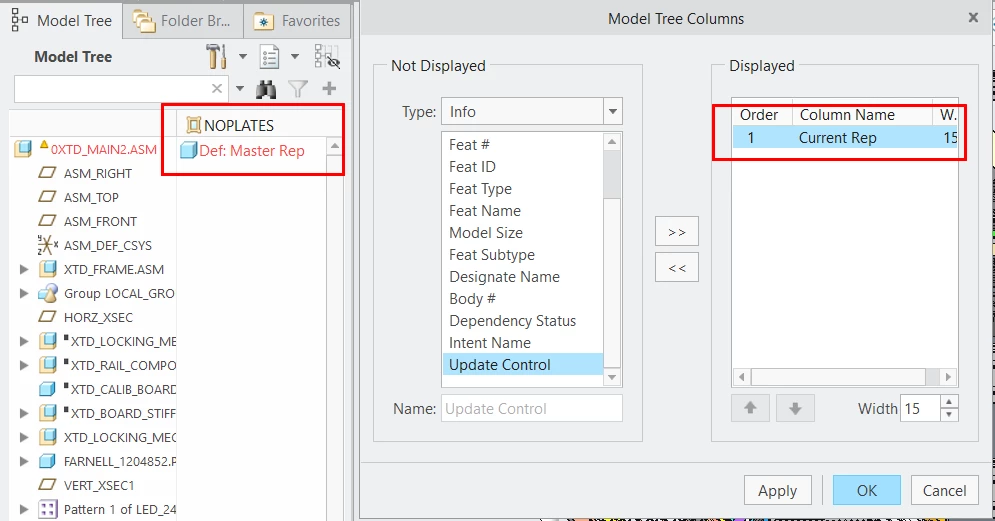
If I open an assembly and select a Simplified Representation to be applied to my assembly, there is automatically an extra column created in my ModelTree that shows the Simpl Reps of all assembly components (if any).

If I then open a subassembly, the ModelTree also has this extra column.

I find this annoying and would like to turn this 'feature' off if possible.

Is there an option that I can set so that no extra columns are created in the ModelTree?


There is not a tree.cfg file on my entire desktop that has specified to add an extra column.


Screenshots show ModelTree and its column settings after and before I open a Simpl Rep in the assembly.
 

Creo2.pngCreo1.png

Best answer by LukaszMazur

Hi,

in your config.pro file (or Configuration Editor in Creo Options) add an option simprep_column_display and set its value to manual. That way the column won't be added automatically and you'd need to configure it manually through Tree Columns.

1 reply

16-Pearl
December 9, 2021

Hi,

in your config.pro file (or Configuration Editor in Creo Options) add an option simprep_column_display and set its value to manual. That way the column won't be added automatically and you'd need to configure it manually through Tree Columns.

EddyVE12-AmethystAuthor
12-Amethyst
December 9, 2021

Brilliant! That does exactly what I want!

I hadn't found that option yet.

Thank you so much!


kdirth
21-Topaz I
21-Topaz I
December 10, 2021

You can also use this button kdirth_0-1639144546809.png at the top of the tree to hide it after it pops up.

There is always more to learn.