13-Aquamarine
March 4, 2024
Solved

Modelcheck font size

  • March 4, 2024
  • 2 replies
  • 1631 views

Can anyone tell me how to adjust the font size in the Modelcheck report? All other font in my Creo 8 GUI is adequately sized, but the Modelcheck report has very small font. Others in my organization are not having this problem. Thank you.

Best answer by PTerribleCAD

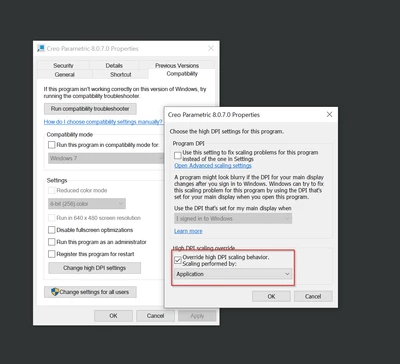
The problem turned out to be that I needed to override the high dpi scaling behavior in the Creo properties. This requires a computer restart to take effect.
 

PTerribleCAD_0-1709820222276.png


2 replies

14-Alexandrite
March 5, 2024

I think modelcheck inside the creo is just interpreting the data from file inside of appdata

It could be problem in your browser settings. Can you try to open the modelcheck file manually? 
C:\Users\username\AppData\Roaming\PTC\ProENGINEER\mdlchk\part.p

RH_8252267_1-1709642695371.png

Can you also check if your scale is 100%

RH_8252267_2-1709643161770.png


13-Aquamarine
March 5, 2024

Thanks for the response. There don't appear to be any recent modelcheck reports in that location. Everything in there is html, png, javascript, text or xml files from last year. I can open them in a browser window and they look o.k., but as I said, nothing in there is recent.

My monitor resolution is at the recommended setting of 150%. If I change it to 100%, everything on that monitor gets nearly too small to read, including the modelcheck report, which seems to scale proportionately smaller as well.

PTerribleCAD13-AquamarineAuthorAnswer
13-Aquamarine
March 7, 2024

The problem turned out to be that I needed to override the high dpi scaling behavior in the Creo properties. This requires a computer restart to take effect.


PTerribleCAD_0-1709820222276.png
