
13-Aquamarine
May 22, 2024
Solved

Multibody Part in Drawing

  • May 22, 2024
  • 2 replies
  • 3403 views

Hello,


I have a multibody part (prt0001) that is a clam shell design containing two bodies. I want to create two drawings - one of one half of the part (Body 1), and one for the other half (Body 2).


Any solutions that I haven't tried below would be much appreciated! Thank you in advance 🙂


I attached the part and drawing I am referencing below.


I have some solutions, but none of them are exactly what I want:

1. Create a new part that references the Body in prt0001. (This is less than ideal because you cannot bring in any dimensions from the original part. All dimensions must be manually placed, which is a lot of unnecessary work).

2. Create two drawings for prt0001 containing both bodies. Hide all bodies you don't want to see when you are ready to export. (However, this stinks because the user needs to remember to hide other bodies, and then hide other bodies in the model. Far less than ideal, especially if you are working on both parts at one time).

3. I tried using Combined States on the drawing, but this doesn't work. I have a video of what happens below.


Thanks again,

Jeff Houston
Best answer by pausob

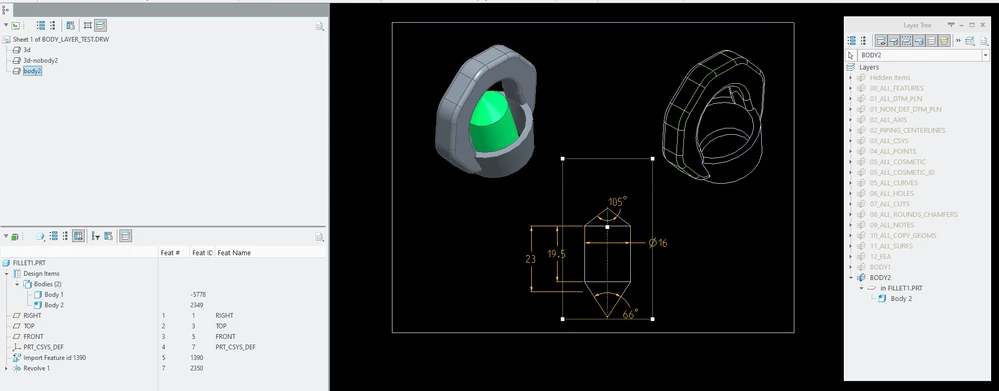
My 2 cents: I think you can use layers and create the drawing containing only the master model.

Put the bodies on separate layers and then hide as needed - this can be done on a per-view basis...

pausob_0-1716444453024.png


2 replies

tbraxton
22-Sapphire II
22-Sapphire II
May 22, 2024

It is not clear what your goal (ideal result) is. In general, I am assuming that;

1) You want to design in a single part file (master model)

2) Split the master model geometry into 2 (derivative) parts

3) Create a drawing for each part (derivative) and show the dimensions, datums, and annotations set up in the master model


Is this accurate account of what you want to do? If this is the goal and you intend to use multibody for the master model, consider the following.


A geometric copy (create part from body) does not copy the feature information over to the new part.

As such there is no way to show feature dimensions in the extracted (derivative) part.

If you create an annotation feature in the source part that holds the dimension that you want to show in the extracted part, then you can re-define the external copy geometry (if you have the AAX license) and tell it to bring those annotations over.

JiffiPop13-AquamarineAuthor
13-Aquamarine
May 23, 2024
Yes this is exactly what I am looking for.

Dale_Rosema
23-Emerald III
23-Emerald III
May 22, 2024

Disclaimer: I have not worked with multibody parts.


Can you put one body on one page and dimension it and the second body on another page and dimension it?