
1-Visitor
December 4, 2013
Solved

Nest smoke alarm: How to create the "fibonacci-like" hole-pattern

  • December 4, 2013
  • 5 replies
  • 19290 views

I just came across this Nest smoke alarm, and got curious about the pattern on the front: https://nest.com/blog/2013/10/08/meet-the-nest-protect-smoke-and-co-alarm/

Is it possible to somehow through one or more pattern features to create something like on the attached picture? I can't crack it myself. Help is appreciated

https://d2pupd7a6asjpt.cloudfront.net/blog/images/2013-10-08/nest_protect_smoke_co_alarm.jpg


This thread is inactive and closed by the PTC Community Management Team. If you would like to provide a reply and re-open this thread, please notify the moderator and reference the thread. You may also use "Start a topic" button to ask a new question. Please be sure to include what version of the PTC product you are using so another community member knowledgeable about your version may be able to assist.
Best answer by TomD.inPDX

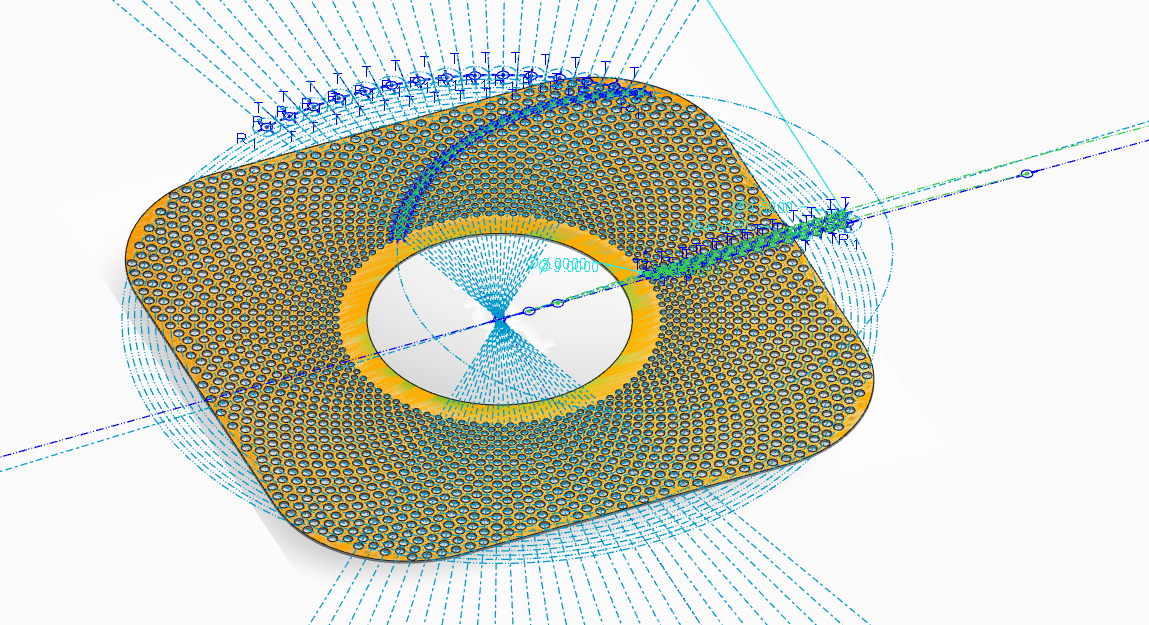
Interesting patterns came up when trying to do this without the reference. For the most part, I got the jest of how to make sure it could be mirrored. I used the arc to get a good pattern and the linear pattern with a "twist" for hole sizing and extrusion.

Full version of Creo 2.0 attached (minus the underlay image so it doesn't mess anyone up).

ID_Grill_sketch_copy.PNG

5 replies

17-Peridot
December 4, 2013

This can be done with a sketch and patterned.

It looks like it follows a simple arc increasing diameters.

You can just 2 guide arcs and make the holes tangent.

1-Visitor
December 5, 2013

Ah, I see.
My mind was stuck on the fill pattern, but I can see how it is possible with a sketch and a pattern around the center axis. I'll give it a try.

Thanks.

-----------------

Quick and dirty test:

It needs some adjustment to look more like the pattern on the nest, but it's definitly possible. Thanks for the help.

fibo_pattern.JPG

16-Pearl
December 5, 2013

Maybe:

pattern1:Arc with holes increasing in size as they go outward

pattern2:revolve pattern 1

1-Visitor
December 5, 2013

you could create that in less than 5 minutes with grasshopper3D

heres a similar example done in it.http://bit.ly/1kfaVgv

Isn't it basically offset circles from the corners of a square with points on the intersections?

17-Peridot
December 5, 2013

Its not fibronacci... more like spirograph with control of a common web thickness.

It wouldn't be hard to duplicate by using the image as an underlay and finding the right guide arcs.

It is a very nice industrial design application.

Esben, looking at yours, it is "drifting"? I was thinking you need to look at the mirror to see if it overlays correctly in both directions. I haven't tried it yet but I may give it a shot just for fun.

1-Visitor
December 5, 2013

Here's a more examples in Grasshopper with a grab of how you would do it in there. You might be able to look at the nodes and extract an idea of how to do it. I could give you more info if you have any questions, I'd give a detailed response now, but I don't have time.

http://bit.ly/1bKgPH9

http://bit.ly/1kfjuId

Here is a great reference with interactive examples. Probably your best bet.

http://bit.ly/1kfjHLp

1-Visitor
December 8, 2013

Thank you for your input!
I'm always amazed by your skills and enthusiasm.

Whenever I have a question, you guys manage to give me a quick and detailed answer that I can learn from.

In this case I ended up using the method Matt came up with, but it's always interesting to see how the same result can be achieved in different ways.

The PTC Community rocks!

nest_pattern+copy.jpg

17-Peridot
December 8, 2013

Nice picture, Esben. Is that a focus effect or is that a SLA part?

1-Visitor
December 9, 2013

Thanks.

It is quick render, that I did with KeyShot.

1-Visitor
January 13, 2014