
10-Marble
November 27, 2023
Solved

Placement of 3D annotation

  • November 27, 2023
  • 4 replies
  • 8574 views

Hey,


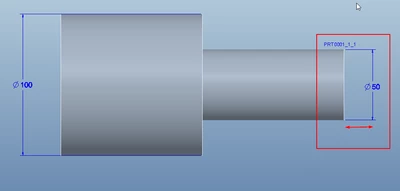
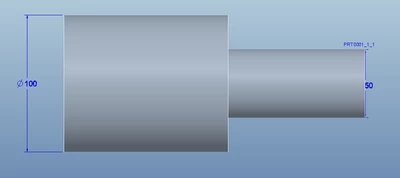
Is there any way to fix a 3D annotation to a specific offset from the model.. Please see picture below.

My problem is, when i change the length of the ø50 cylinder part the dimension gets hidden in the solid model. I want this dimension to follow the model, instead of just staying in its place.
 

11.png

22.png

So far i have not been able to find a solution to fix this, I am running Creo 10 btw!

Thanks,

Best answer by BrianOlesen

Thanks for this.


In general I am limited on running exe files, but i see how it works, and it could might be a possibility.

But i am unsure on how this works, as the changes to my model is done with creo running in backgroud (-g:no_graphics), regenerated on the basis of a textfile and saving the model... I am not sure it is possilble to combine the run of trail file and this function.


Regarding the case with PTC support: They do unfortunately not have a solution! They said that i could submit it as a product idea and refered to a similar case: https://www.ptc.com/en/support/article/CS264008 

4 replies

24-Ruby III
November 28, 2023

Hi,

I am not sure whether such functionality is available,. Please ask PTC Support.

21-Topaz I
November 28, 2023

If this functionality exists, I am not aware of it.

10-Marble
November 29, 2023

Thanks for the replys,


Anybody then have an idea for a workaround or other good solution to this challange?


Is it possible to make a mapkey that takes the dimension and moves it xx mm in 1 direction. Remebering that i can have x numbers of dimensions i need to move, and not know the start position, so it should be on the base of the dimensions internal id that they are selceted and moved!

24-Ruby III
November 29, 2023

@BrianOlesen wrote:

Thanks for the replys,


Anybody then have an idea for a workaround or other good solution to this challange?


Is it possible to make a mapkey that takes the dimension and moves it xx mm in 1 direction. Remebering that i can have x numbers of dimensions i need to move, and not know the start position, so it should be on the base of the dimensions internal id that they are selceted and moved!


Hi,

be brave, ask PTC Support and let us know.

10-Marble
November 30, 2023

Case has been submitted 🙂

Dale_Rosema
23-Emerald III
23-Emerald III
November 30, 2023

I asked about centerlines way back and received the answer that this wasn't part of the functionality:


https://community.ptc.com/t5/3D-Part-Assembly-Design/Drawing-changes/m-p/233665