
1-Visitor
October 28, 2016
Solved

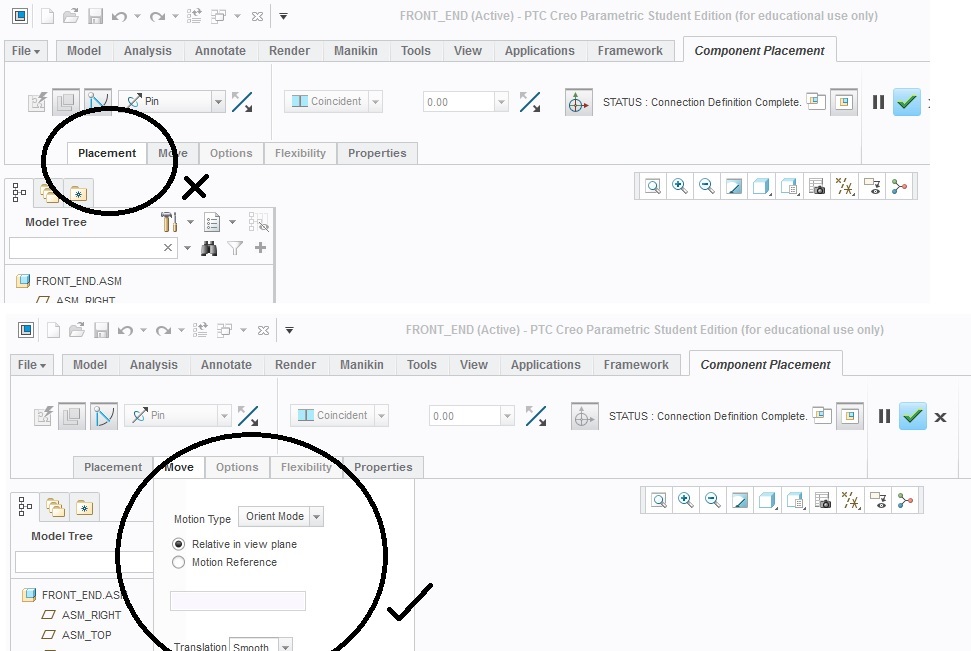
'Placement' sub menu won't appear - what have I missed?

  • October 28, 2016
  • 2 replies
  • 16314 views

Hi all,

I am working on Creo 3 with various assemblies and sub-assemblies. Until recently it was functioning normally, but now when placing an object/assembly, the sub menu under the 'Placement' tab won't appear. The adjacent Move/Options/Flexibility/Properties tabs work fine, its just the Placement.

Hopefully one of you guys can help with the problem.

Mike.creo_issues.jpg
Best answer by MartinHanak

Hi,

see Re: Placement disapperaed

MH

2 replies

18-Opal
October 28, 2016

Hi Mike,

I feel as if I've come across this issue before, for a different customer, but I am unable to locate it.

  1. Have you tested on another machine?
  2. Is this for all assemblies or just some?
  3. Has Creo been running for a long period of time, without a restart?  If so, close down Creo and launch it.
  4. Test without any configs.

If I can find that other case, I will add additional notes here.

Thanks,

Amit

1-Visitor
October 29, 2016

Hi Amit,

I haven't tested on another machine, as well. I don't have one to test. It's the same for all assemblies, and also whether Creo has been running for hours or just started. I am running it without any configs loaded up.

Thanks for your help,

Mike.

1-Visitor
October 30, 2016

It looks like you are using mechanism connections which are handled differently than placement.

I see the message "Connection Definition Complete," which is part of mechanism, not assembly placement, which is why only Move is available in order to let you drag the mechanism.

I don't know how you got there, but that seems to be where you are and it is acting as I would expect it to act.

24-Ruby III
October 30, 2016
1-Visitor
October 31, 2016

Beautiful.

The last post in that thread;

"In such cases other option can be used to rest the position of panels. Option "Rest Panels Position" is available under File > Options > Window Settings "Rest Panels Position" "

Got things sorted straight away.

Thanks for the help everyone. I can resume as normal!

1-Visitor
March 31, 2017

This work...

"In such cases other option can be used to rest the position of panels. Option "Rest Panels Position" is available under File > Options > Window Settings "Rest Panels Position" .

Thanks.

PTC should make an article about this fix and put it  in the Technical Support Search section