
1-Visitor
November 14, 2012
Solved

Plotting drawing extents instead of current view?

  • November 14, 2012
  • 3 replies
  • 5012 views

Hello everyone,

I'm a relatively new convert to CREO and am adjusting to the differences. One thing that's changed (for me) from WF5 is that when I print a 2D drawing to PDF it prints only what I'm looking at on the screen. Other co-workers tell me their systems have always worked this way but in WF5 My system would always plot the whole drawing regardless of how I was viewing it (zoom/pan didn't matter.)

Is this a setting that I just can't find or was I just lucky before?

Thanks in advance!

Landon


This thread is inactive and closed by the PTC Community Management Team. If you would like to provide a reply and re-open this thread, please notify the moderator and reference the thread. You may also use "Start a topic" button to ask a new question. Please be sure to include what version of the PTC product you are using so another community member knowledgeable about your version may be able to assist.
Best answer by SylvainA.

Yes, I'm using Creo element/Pro 5.0 ...

Don't you have any setting tab in the Print dialog ?

That's what i'm talking about:

Capture5.JPG

3 replies

Dale_Rosema
23-Emerald III
23-Emerald III
November 14, 2012

I am still on WF5/Creo and no matter what the zoom level is at, both .pdf and .dwg printing is set to the full drawing/boarder, but Ctrl-P printing to a printer prints at the zoomed level.

24-Ruby III
November 15, 2012

Landon,

try to add the following option at the end of config.pro file:

plot_to_scale_full_window yes

Martin Hanak

1-Visitor
November 15, 2012

I had tried that already and it did not change the behaviour... 😕 Thanks though.

Landon

24-Ruby III
November 15, 2012

Landon,

I can test your problem, if you tell me what version do you use ...

Creo Parametric 1.0 or 2.0 or Creo Elements/Pro 5.0 ?

F000 or M010 or M020 or something else ?

Also I need to know what command do you use.

Martin Hanak

1-Visitor
November 15, 2012

When you say print a 2D drawing to PDF, you mean use a PDF printer like PDFcreator ?

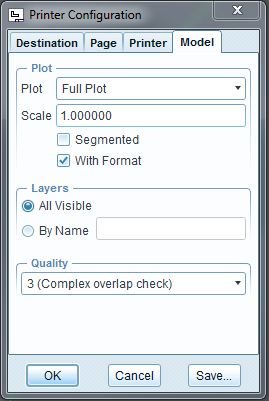
If so, you must set your Plot option to "Full plot" (Publish>Print/Plot>Settings>Model>Plot>Full plot)

This option is set by the *.PCF file used to print.

1-Visitor
November 15, 2012

I mean that I am using the "Ctrl-P" command to bring up the Print dialog which is setup to use "MS Printer Manager." I then have "Adobe PDF" (Adobe Acrobat X Pro) as a printer option. There is no "publish" option on my CREO build... though it was there in WF5.

Landon

SylvainA.1-VisitorAnswer
1-Visitor
November 15, 2012

Yes, I'm using Creo element/Pro 5.0 ...

Don't you have any setting tab in the Print dialog ?

That's what i'm talking about:

Capture5.JPG