15-Moonstone
June 28, 2022
Solved

Position of the geometric tolerance in the drawing dimension

  • June 28, 2022
  • 1 reply
  • 3117 views

Hi,
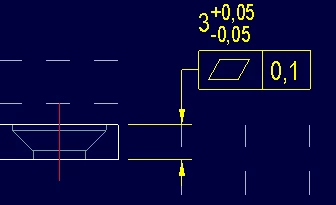
If I add a geometric tolerance to a drawing dimension, the program proposes it to me as follows:

bmancini_0-1656401682884.png

I don't like the dimension line hooking to the tolerance instead of the drawing dimension value.
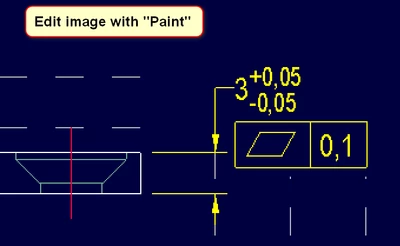
I would prefer the dimension line to snap to the drawing dimension value, as shown in the following image edited by me with "Paint".

bmancini_1-1656401914592.png

Is it possible to obtain this result? Can you tell me how?
Thank you all.

P.S. I use Creo 9.0.0.0


Best answer by tbraxton

You should be able to change the attachment of the GD&T in the drawing. There are m any attachment options as detailed below.

◦ Automatic — This is the default mode, with which you can create the following GTOL attachments:
▪ Free (unattached) GTOL. You can click on a location in the graphics area to place the GTOL.
▪ GTOL with its leader attached to the model geometry, such as edge, dimension witness line, coordinate system, axis center, axis lines, curves, or surface points, vertices, section entities, or draft entities.
▪ GTOL attached to a dimension or dimension elbow.
 
* You can right-click and select Dimension Elbow command on the shortcut menu to attach the GTOL to the dimension elbow.
▪ GTOL attached to a note elbow
▪ GTOL attached to another GTOL
▪ GTOL attached to another Datum Tag
◦ Make Dim — This mode allows you to create a dimension line and place the GTOL frame attached to it.
◦ Offset — This mode allows you to place the GTOL frame at an offset from the following drawing objects:
▪ Dimension
▪ Dimension Arrow
▪ GTOL
▪ Note
▪ Symbol


Refer to this link for details.

http://support.ptc.com/help/creo/creo_pma/usascii/index.html#page/detail/gtols_insert.html 

1 reply

tbraxton
22-Sapphire II
tbraxton22-Sapphire IIAnswer
22-Sapphire II
June 28, 2022

You should be able to change the attachment of the GD&T in the drawing. There are m any attachment options as detailed below.

◦ Automatic — This is the default mode, with which you can create the following GTOL attachments:
▪ Free (unattached) GTOL. You can click on a location in the graphics area to place the GTOL.
▪ GTOL with its leader attached to the model geometry, such as edge, dimension witness line, coordinate system, axis center, axis lines, curves, or surface points, vertices, section entities, or draft entities.
▪ GTOL attached to a dimension or dimension elbow.
 
* You can right-click and select Dimension Elbow command on the shortcut menu to attach the GTOL to the dimension elbow.
▪ GTOL attached to a note elbow
▪ GTOL attached to another GTOL
▪ GTOL attached to another Datum Tag
◦ Make Dim — This mode allows you to create a dimension line and place the GTOL frame attached to it.
◦ Offset — This mode allows you to place the GTOL frame at an offset from the following drawing objects:
▪ Dimension
▪ Dimension Arrow
▪ GTOL
▪ Note
▪ Symbol


Refer to this link for details.

http://support.ptc.com/help/creo/creo_pma/usascii/index.html#page/detail/gtols_insert.html 

bmancini15-MoonstoneAuthor
15-Moonstone
June 28, 2022

Thank you tbraxton,
using the "Offset" option I can place the geometric tolerance under the value, just as I want.
I would have preferred an automatic setting perhaps in the "iso.dtl" file, but a manual positioning can also be fine.