
4-Participant
April 22, 2024
Solved

Problem : Delete segment with Modernized project/offset tool

  • April 22, 2024
  • 2 replies
  • 1932 views

Hello


I'm creating this post following the switch from CREO 8 to CREO 10.
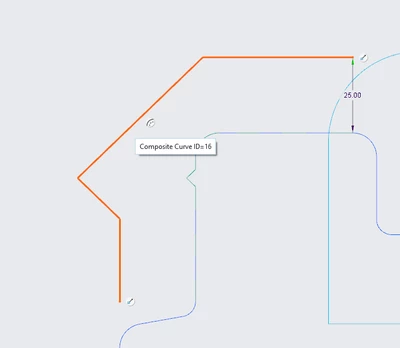
I make a lot of use of the offset/projection and segment uncut functions in the sketches I create, except that with the new tool this is totally broken.


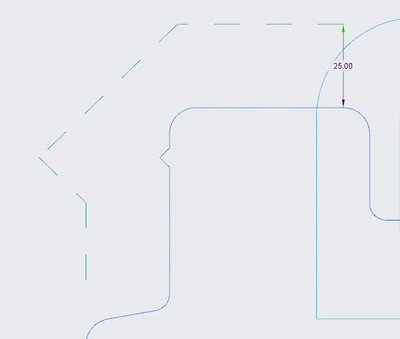
Here's an image to illustrate my problem : I want to remove the corner and keep the two straight lines.
 

Lmartins_0-1713793744467.png

Lmartins_1-1713793759477.png


I was able to browse other topics where the subject of the new tool is discussed but no solution seems to have been given.

Do you have any information on the subject? Would it be possible to have an option to go back to the old tool or to make it differently ? Is it possible to no longer consider the projection/offset as a loop?


Thanks and have a nice day,


Leo


Best answer by StephenW

This product idea https://community.ptc.com/t5/Creo-Parametric-Ideas/Fix-Modernized-Project-and-Offset-Tools-in-Sketcher/idc-p/922607/highlight/true#M20261 is high on the product managers list, (Martin Neumueller) It has his attention.

He posted a potential way to go back to creo 8 functionality. You may need to contact PTC support for info, maybe. 

2 replies

StephenW23-Emerald IIIAnswer
23-Emerald III
April 22, 2024

This product idea https://community.ptc.com/t5/Creo-Parametric-Ideas/Fix-Modernized-Project-and-Offset-Tools-in-Sketcher/idc-p/922607/highlight/true#M20261 is high on the product managers list, (Martin Neumueller) It has his attention.

He posted a potential way to go back to creo 8 functionality. You may need to contact PTC support for info, maybe. 

Lmartins4-ParticipantAuthor
4-Participant
April 26, 2024

Hello StepenW


Thanks for your anwser, this is exactly what I wanted.


Leo

23-Emerald III
April 26, 2024

@Lmartins Hopefully PTC will continue working on this and come up with something reasonable.

Feel free to join in on that IDEA and state your specific case (especially if it hasn't already been covered) to help Martin understand the needs of the user..

At the very least, Kudo the idea so it help PTC understand how many users this affects.

19-Tanzanite
April 23, 2024

Yes, in the new system, things are not seemingly as easy; but I don't think they are totally broken and I think the new system is more robust.


Take your example: after you define the offset chain, you can delete the composite curve, and the offset reference remains.  You can now sketch two lines to define your intent::

pausob_1-1713894347770.png

pausob_2-1713894355503.png

pausob_4-1713894402841.png

pausob_5-1713894414490.png


Yes, it is a bunch of extra steps; but arguably, the new sketch is more robust; you can flex that single offset dimension and your design intent follows:

pausob_6-1713894504275.png

-->

pausob_7-1713894524306.png

(in the old system, I often found that trimming the offset chain was easy, but then you ended up with a lot of extra offset dimensions to manage)