1-Visitor
September 14, 2022
Solved

Re: Make assembly component transparent

  • September 14, 2022
  • 2 replies
  • 2456 views

As per the original post


Hello Jose_Costa,

Quick question.  Is the Video Link: 4874 still available?


Thank you,

Mike

Best answer by kdirth

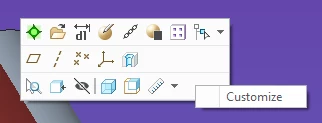
RMB on tool bar and select Customize:  

kdirth_0-1663188814194.png

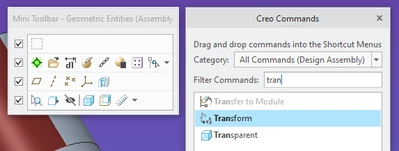
Search for Transparent and drag to toolbar:  
kdirth_1-1663188887668.png


2 replies

23-Emerald III
September 14, 2022

I'm not sure what the video was, that was several community migrations back. 

If you are asking about adding a mapkey to the tool bar, you can go to file options and add them to a quick access toolbar.

StephenW_0-1663181745846.png


1-Visitor
September 14, 2022

Hi StephenW,

Thank you for getting back to me!

From the description, the video may have showed how to make a mapkey for making parts transparent.  


However, I just found out that Creo 4 has the "built-in" transparent option that I was looking for.


Thank you,

MS

kdirth
21-Topaz I
21-Topaz I
September 14, 2022

I have a map key I created a few years ago, but now also have transparent and solid added to the quick access tool bar.  If i click on a part the button is right there.

kdirth_0-1663186844858.png


There is always more to learn.
1-Visitor
September 14, 2022

Hi Kdirth,

If you don't mind me asking, how did you get the Transparent added to your quick access toolbar?  I'm using Creo 4.


So true!  Every day is a learning experience with Creo 😁.


Thank you,

MS


kdirth
21-Topaz I
kdirth21-Topaz IAnswer
21-Topaz I
September 14, 2022

RMB on tool bar and select Customize:  

kdirth_0-1663188814194.png

Search for Transparent and drag to toolbar:  

kdirth_1-1663188887668.png


There is always more to learn.